
Recycle Bin
Package: BASIC
1. General
When a record is deleted in brainX, it is only marked as "deleted" and displayed in the Recycle Bin module. Only when a record is also deleted in the Recycle Bin module is it irreversibly removed from the database.
Records from the following modules are moved to the trash after deletion:
- Tasks
- Orders
- Reports
- Visit Reports
- Connect
- Deals
- Services
- Documents
- Email Marketing
- Emails
- Incoming Invoices
- Purchase Orders
- Add-ons
- Credits
- Campaigns
- Comments
- Contacts
- Contingents
- Leads
- Vendors
- Licenses
- Organizations
- Partner
- Price Lists
- Products
- Projects
- Project Milestones
- Invoices
- Appointments
- Tickets
- Timesheets
- Templates
- Wiki
There is no separate module for comments. However, deleted comments are listed in the Recycle Bin module and can be restored.
This section only describes special fields or functionalities of the module, as all general brainX functionalities are described elsewhere in the manual.
2. List View
Records are displayed in the list view organized by module. Via the "Module" selection list, the desired module is selected whose deleted records are to be displayed.
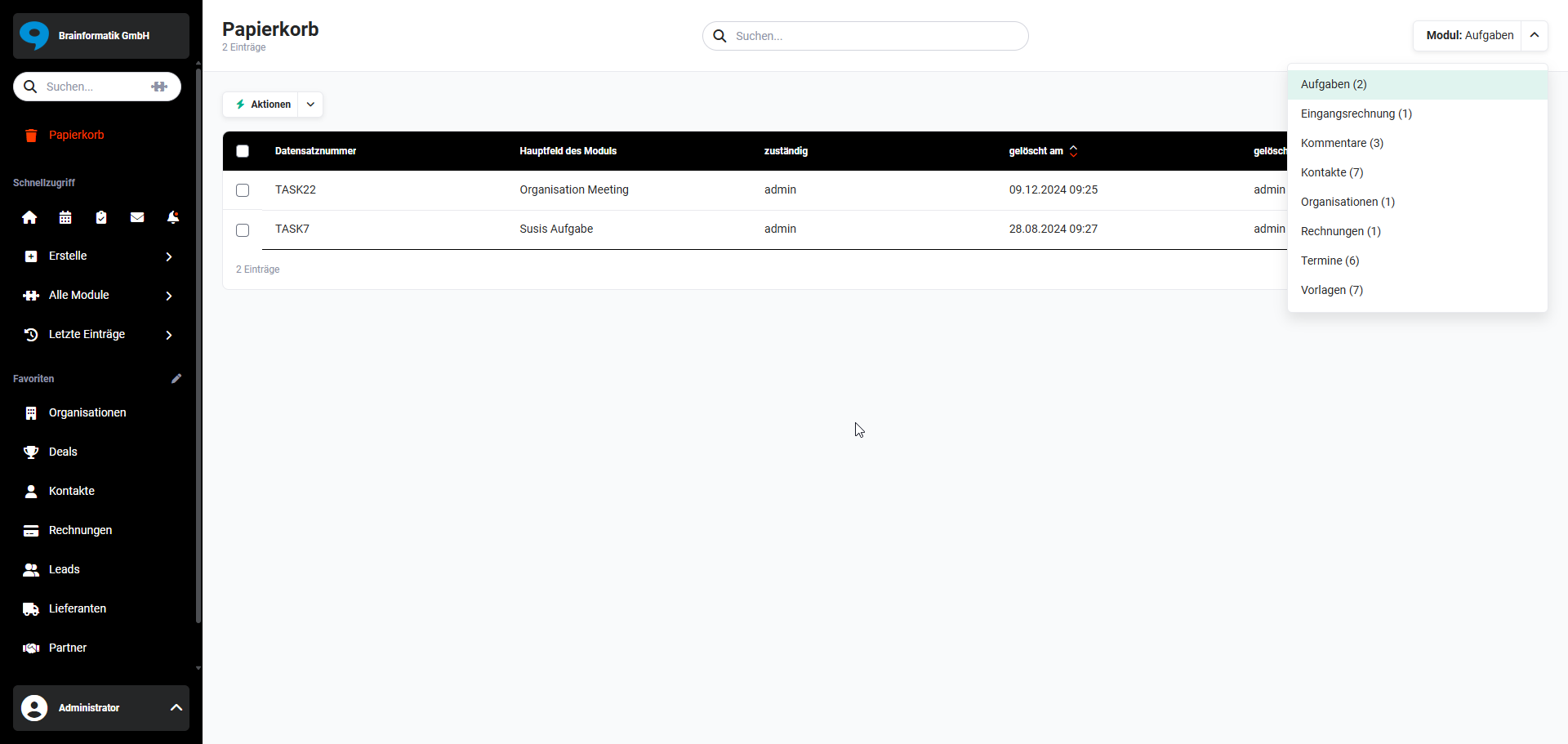 Trash – Module Selection
The same columns are displayed in the list view for all modules:
- Record Number → internal record number
- Main field of the module → name of the record, e.g., contact name
- Responsible → responsible user of the record
- Deleted on → date and time when the record was deleted
- Deleted by → user who deleted the record
- Actions → "three dots" icon per row with the actions "Restore" and "Delete"
2.1. Actions
The following module-specific actions are available in the list view:
| Action | Prerequisite | Functionality |
|---|---|---|
| Restore | none | Restores the selected records and moves them back to the respective module |
| Delete Selected Records | Permission Admin or CustomerAdmin required. | Permanently and irreversibly deletes the selected records from the database |
| Delete Records of the Module | Permission Admin or CustomerAdmin required. | Permanently and irreversibly deletes all records of the currently selected module from the database |
| Empty Entire Trash | Permission Admin or CustomerAdmin required. | Permanently and irreversibly deletes all records of all modules from the database |
Records deleted from the Trash module are permanently removed from the database and cannot be restored.
Individual, multiple or all records in the list view can be selected using checkboxes to perform the "Restore" and "Delete Selected Records" actions.
When records containing personal data (e.g., contacts, leads) are permanently deleted, the Change Tracking is also anonymized accordingly. This behavior is independent of the GDPR integration and is always active.
3. Detail View
A detail view of records in the Recycle Bin module is not available!
4. Deletion Rules
In Global Settings – Module Management, deletion rules can be defined for the Recycle Bin module that specify when records are automatically deleted from the trash. A general deletion definition as well as deviating definitions per module can be configured.
For detailed information, see Module Management – Trash Module.
5. Practical Examples
1 – Restoring an Accidentally Deleted Contact
An employee accidentally deletes a contact record that is still actively used. Since deleted records in brainX are initially only marked as deleted and moved to the trash, restoration is straightforward.
In the Recycle Bin module, the Contacts module is selected via the Module selection list. The list view shows all deleted contacts with record number, name, deletion date and deleting user. The affected record is marked via checkbox and moved back to the Contacts module via the Restore action. The record is then fully available again.
2 – Selectively Cleaning Up the Trash of a Specific Module
Over time, many outdated and no longer needed report records have accumulated in the trash for the Reports module. An administrator wants to remove these specifically without emptying the entire trash.
In the Recycle Bin module, the Reports module is selected via the Module selection list. After a brief review of the entries, the entire contents of the trash for this module are permanently and irreversibly deleted via the Delete Records of the Module action. Records of other modules remain unaffected. The action requires Admin or CustomerAdmin permission.
3 – Configuring Automatic Deletion Rules for the Trash
To keep the trash lean in the long term, deleted records should be automatically and permanently removed after a defined period. In Global Settings – Module Management, a general deletion rule is configured that automatically permanently deletes all records after 90 days in the trash.
For particularly sensitive modules – e.g., Contacts or Leads – a deviating, longer retention period of 180 days is defined. This provides sufficient time for restoration in the event of accidental deletions, while the trash is also automatically cleaned up.
6. Frequently Asked Questions
What happens when I delete a record in brainX?
Deleted records are initially only marked as deleted and listed in the Recycle Bin module – they are not immediately irreversibly removed. Only when a record is also deleted from the trash is it permanently and irreversibly removed from the database.
Which modules support the trash?
The trash supports most modules in brainX, including Tasks, Orders, Reports, Deals, Documents, Emails, Incoming Invoices, Contacts, Leads, Organizations, Invoices, Tickets, Timesheets and many more. A complete list can be found in section 1. General of this page. Modules such as Delivery Notes, on the other hand, are directly and permanently removed when deleted – without going through the trash.
Can I restore multiple records simultaneously?
Yes. In the list view of the trash, multiple records can be marked using checkboxes and moved back to the respective module together via the Restore action.
Who may permanently delete records from the trash?
The actions Delete Selected Records, Delete Records of the Module and Empty Entire Trash require Admin or CustomerAdmin permission. Restoring records, on the other hand, is available to all users without special permission.
What happens to personal data when a contact is permanently deleted?
When records containing personal data – e.g., contacts or leads – are permanently deleted from the trash, the associated change tracking is automatically anonymized. This behavior is independent of the GDPR integration and is always active.
Can I specify that records are automatically deleted from the trash after a certain period?
Yes. In Global Settings – Module Management, deletion rules can be configured. A general period for all modules as well as deviating periods for individual modules can be defined.