
Record Numbers
Package: BASIC
1. General
In the settings item “Record numbers”, the number ranges of records are configured per module.
2. Number ranges
A record number consists of a prefix and a sequential number.
The prefix and the numbering can be changed at any time, as long as the new entry in combination was not already in use before.
The prefix can be adjusted if required. By clicking a value in the “Prefix” and “Next number” columns, these can be edited directly.
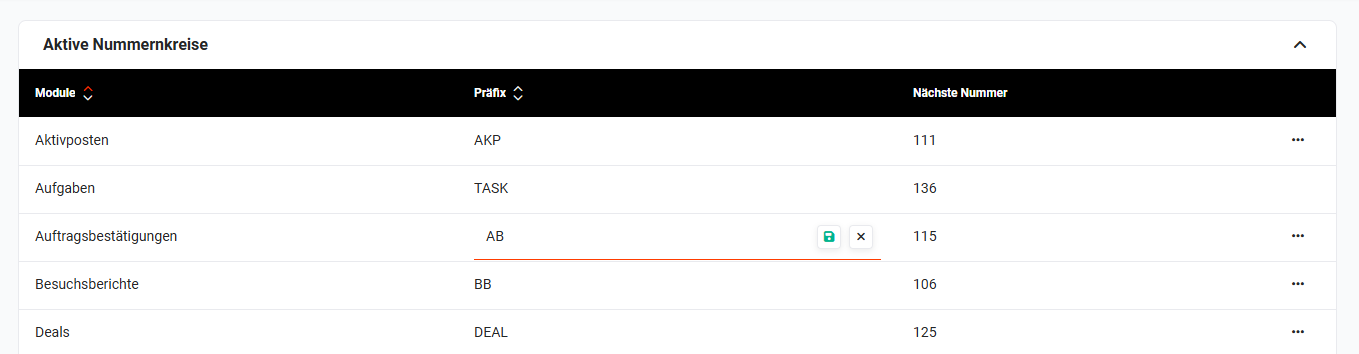 Active number ranges - edit prefix
Once a prefix has been assigned in combination with a specific number, this combination - by changing the prefix and the next number - cannot be reused.
When importing records, the prefix and the sequential numbering are assigned automatically per record.
If an existing customer number is to be adopted during a data import, but it is not continuously sequential in the source file, then the correct continuation of the numbering can be enabled by inserting test records.
An example for a contact import:
- Contact 1 / Cust. no. 1
- Contact 2 / Cust. no. 3
So that Contact 2 also receives Cust. no. 3 in brainX, an additional “test contact” must be inserted between Contact 1 and 2 in the source file (CSV).
3. Practical examples
1 - Adjusting the prefix after a company rebranding
Initial situation: A company has changed its name and would like new invoices to start with the new abbreviation from now on - e.g. MN- in future instead of RE-.
Procedure: In the Record numbers, in the row of the Invoices module, the prefix is clicked directly in the field and changed to the new value. After saving, all newly created invoices automatically receive the new numbering.
Result: New invoices carry the updated abbreviation. Existing invoices retain their original number - the continuity of the records is preserved.
2 - Adopting existing customer numbers during data import
Initial situation: A company switches to brainX and would like to retain the existing customer numbers from the old system when importing its contacts. However, the numbers are not sequential without gaps.
Procedure: In the import file (CSV), test contacts are inserted as gap fillers between the contacts with non-consecutive numbers, so that the numbering in the file is continuously sequential. The prefix and the start number are set accordingly in the Record numbers. After the import, the test contacts are deleted again.
Result: All imported contacts receive the correct customer numbers from the legacy system. Number continuity is ensured.
3 - Restarting the number range for a module
Initial situation: A company initially used brainX in a test phase and created numerous test records in the process. After going live, the numbering should start from the beginning.
Procedure: In the Record numbers, the Next number for the desired module is set to the desired starting value - e.g. to 1. Care must be taken here that the new combination of prefix and number was not yet in use. If necessary, a new prefix is additionally assigned to avoid conflicts with test numbers.
Result: New production records start with a clean, defined numbering. Existing test records retain their old numbers and can thus be easily identified.
4. Frequently asked questions
Can I reassign an already used prefix-number combination?
No. Once a combination of prefix and number has been assigned, it cannot be reused — not even after changing the prefix or the start number. This serves the unique identifiability of all records in the system.
What happens to existing records if I change the prefix?
Records that have already been created retain their original number. Changing the prefix only affects newly created records.
Can I configure the number ranges individually for all modules?
Yes, a separate number range with an individual prefix and its own sequential number is maintained for each module. The configuration is done independently per module.
Are record numbers assigned automatically during import?
Yes, during import the prefix and sequential number are assigned automatically per record based on the currently configured number range. If existing numbers from a legacy system are to be adopted during import, the import file must be prepared accordingly - for numbers that are not sequential without gaps, test contacts must be inserted as gap fillers.
Can I adjust the Next number manually at any time?
Yes, the value in the Next number field can be edited directly at any time. It should be noted that the new combination of prefix and number must not already be assigned. In case of doubt, it is additionally advisable to adjust the prefix in order to reliably rule out conflicts with existing numbers.