
Software Info
Package: BASIC
1. CRM Information
In the "CRM Information" area, all relevant data about the brainX installation is displayed.
| Field | Description |
|---|---|
| CRM Version | The version number of the currently used brainX version. |
| Last Updated On | Date when brainX was updated to the displayed CRM version. See also Update Information. |
| Booked Licenses | Number of booked licenses |
| Available Licenses | Number of still available licenses |
| Booked Storage (MB) | Display of the size of the booked storage space in megabytes (MB). Note: not relevant for on-premise installations. |
| Available Storage (MB) | Display of the remaining free storage space in megabytes (MB). |
| License valid until | Date until which the IonCube license is valid. Note: date only available for on-premise installations. Not displayed for cloud installations. |
2. Logs
This area is exclusively available for brainX GmbH and customers using a brainX on-premise installation!
When software problems occur in the brainX system, corresponding entries and error messages are written to log files.
The log files are only relevant for server administrators and require appropriate expertise to interpret.
For on-premise installations where brainX GmbH does not have access to the system, the log files can be passed to brainX GmbH for analysis, e.g. to identify a malfunction.
The various log files, such as php_error.log and sql.log, are listed individually.
To view a log file, simply click on the name of the log file. After clicking on the filename of a log file, the file is opened in a popup.
In the upper right of the popup there are two actions:
- Action icon "Refresh" (icon "two semicircles") → The file view is refreshed.
- Button "Autorefresh" → After clicking the button, a flyout menu opens in which the time interval can be set at which the file is automatically refreshed (-- for no refresh, and 2 s, 5 s and 10 s for an interval of 2, 5 and 10 seconds).
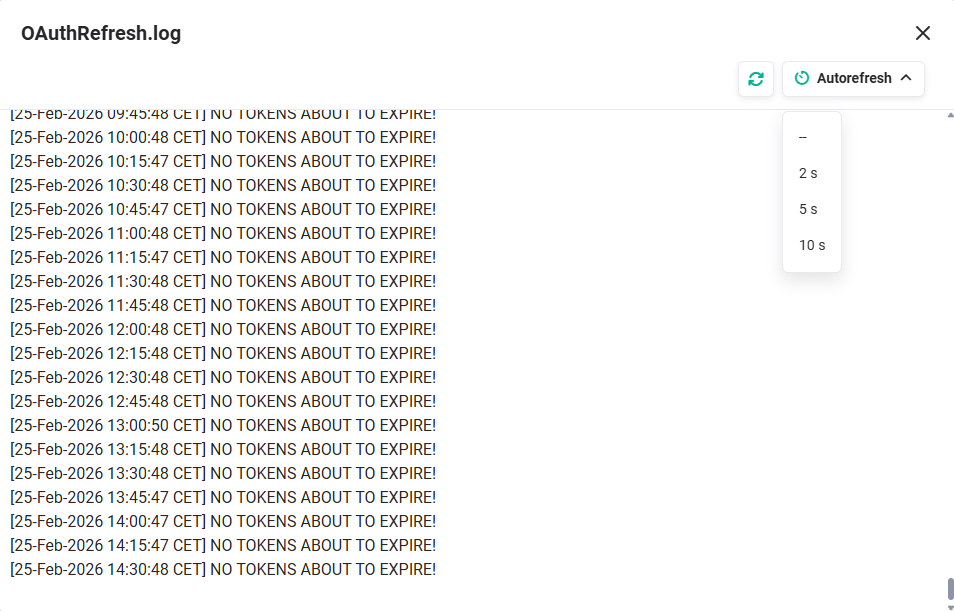 Actions in the popup of a log file
2.1. Log Actions
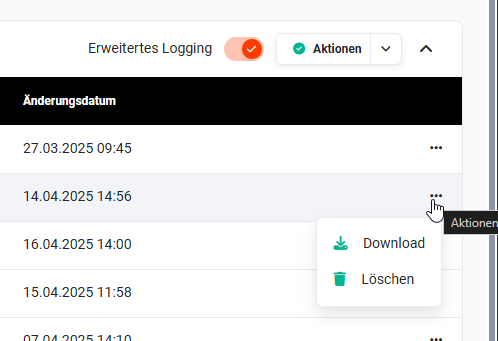 Log file actions
The following actions are available in the Logs area:
- Extended Logging (toggle) → Extended logging is activated to receive more or more detailed logs
- Actions (button) → The log files selected via checkbox can be deleted
- Actions per log file (icon "three dots") → The actions "Download" and "Delete" are available separately for each log file
3. Values from php.ini
This settings item is only available for users with the "Admin" rights setting and not for "CustomerAdmin" or "Superuser". An exception applies to customers with an on-premise installation.
This area displays the values from the "php.ini" configuration file of the server.
| Field | Description |
|---|---|
| date.timezone | The default timezone used by all date/time functions. |
| display_errors | Specifies whether errors should be printed to the screen as part of the output or whether they should be hidden from the user. |
| error.log | Name of the file in which script errors are logged. |
| error_reporting | Sets the error reporting level. |
| log_errors | Specifies whether script error messages should be logged in the server's error log or in the error_log. |
| max_execution_time | Sets the maximum time in seconds that a script is allowed to run before it is terminated. |
| max_input_time | Maximum time that each script is allowed to spend parsing request data. |
| max_input_vars | Maximum number of input variables (e.g. from GET, POST or cookies) that are accepted per request. |
| memory_limit | Defines the maximum available memory. |
| post_max_size | This configuration setting sets the limit for the total amount of data that a PHP script can receive via the HTTP POST method. |
| register_globals | The register_globals directive in php.ini causes all request parameters to be available under their name as variables in the global scope. |
| safe_mode | When safe_mode is active, various PHP functions are privileged or restricted. |
| session.gc_maxlifetime | session.gc_maxlifetime defines the number of seconds after which data is considered "garbage" and may be disposed of. |
| upload_max_filesize | The upload_max_filesize directive defines the maximum allowed size for file uploads in PHP. |
| extensions | Display of installed PHP extensions. |