
Services
Package: BASIC
1. General
In the Services module, all services with fixed pricing offered by the company are recorded, categorised and priced – similar to a catalogue. These are then available for selection in the Billing modules (e.g. Sales Orders, Deals, Invoices).
Records from the Services module can be selected in the so-called "product block". For detailed information, see the section Product block in Billing modules in the handbook.
A company offers consulting hours. The service is created with the Category Consulting and the Unit Hours. A price of 85.00 EUR is set for the first 5 hours; from the 6th hour onwards, a price scale of 75.00 EUR per hour applies. The service is available in several currencies – the prices are calculated via the more currencies popup based on the stored exchange rates.
A monthly maintenance service is created as a service with the Price type Monthly price and the Unit Flat rate. A percentage surcharge for monthly billing is defined via the monthly surcharge. The service is assigned to a DATEV ledger account and is available in the product block for invoice creation.
This section only describes special fields and functionalities of the module, as all general brainX functionalities are described elsewhere in the handbook.
2. List view
The list view in the Services module offers the usual functionalities of a list view. For more detailed information, see the section Layout/Structure - List view.
2.1. Actions
In the list view, general actions are available – depending on the module. An overview and description of all general actions can be found in the section Actions (List view).
Module-specific actions are not available in this module.
2.1.1. Sales price in bulk editing
The Sales price field can be enabled for bulk editing. Enabling is done in the Layout editor via the Bulk change setting.
The following restrictions apply to bulk editing of the sales price:
- The value only applies to the main currency of the record. Prices in other currencies remain unchanged and must still be maintained manually.
- The popup for fixing individual currencies is not taken into account during bulk editing.
Bulk editing is particularly suitable for relative changes, e.g. increasing or decreasing all prices by 10%. Caution is advised with absolute values across records with different main currencies – the same amount in euros and in francs rarely makes sense.
3. Detail view
3.1. Fields
The following table describes mandatory fields as well as fields whose function is not obvious. All other fields are self-explanatory.
Base data block
| Field | Description |
|---|---|
| Title * | Name of the service |
| active | When deactivated, the service is no longer available for selection in the product block |
| Category |
|
| Unit |
|
| Surcharge monthly / quarterly / semi-annually / annually | Optional percentage surcharge per billing interval; applied to the base price in the product block when the corresponding interval is selected |
| Mandatory item | If the checkbox is activated, this item must be confirmed by the recipient when signing via Digital signature (DocuSign/DocuSeal). Mandatory items are marked accordingly in the document. |
*Mandatory field
Price information block
| Field | Description |
|---|---|
| Price | Sales price of the service in the base currency.
Additional currency prices can be stored via the more currencies action icon – see Section 3.1.1 |
| Gross price | When activated, the entered price is treated as a gross price
Warning If the gross price was activated when creating a service, this cannot be changed after the first save. |
| Tax class | Assigned VAT level – see Global settings – Currencies & Taxes |
| Price type * |
|
*Mandatory field
Quantity, list price and sales prices of items in the product block can be entered with up to 6 decimal places. Trailing zeros are truncated in the display. This is particularly helpful when billing small units (e.g. API tokens).
3.1.1. Additional currencies
The "more currencies" action icon is only available in the create and edit views.
After clicking the "more currencies" action icon, a popup window of the same name opens:
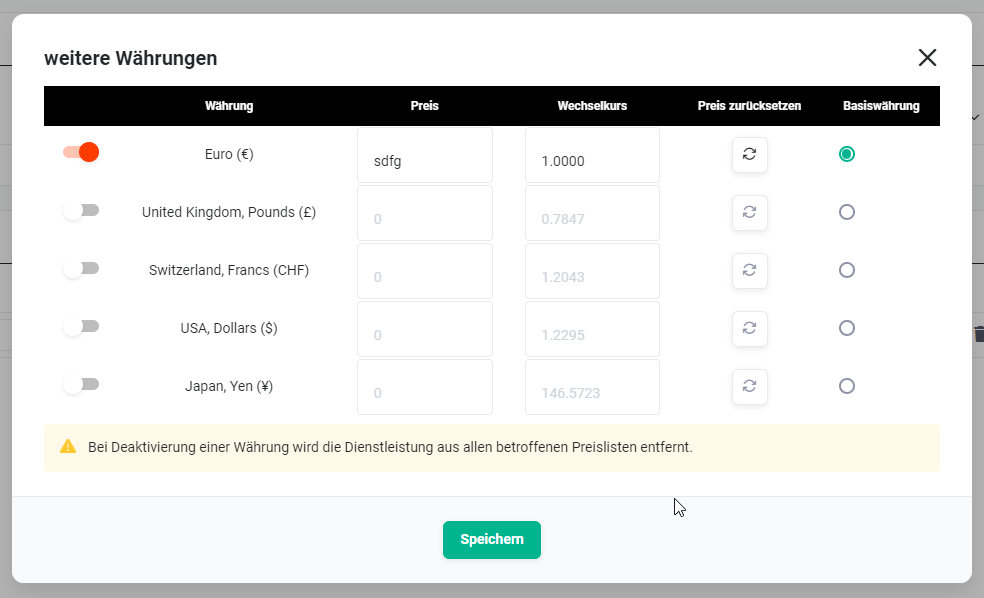 More currencies popup
The "more currencies" popup lists all currencies that have the status "active" in Global settings - Currencies & Taxes.
A checkbox is used to define which currencies are available for the service. The base currency is defined via a radio button. For all activated non-base currencies, the respective price can be calculated automatically via the recalculate button based on the stored exchange rate.
After saving, the price is displayed in the currency stored in My Preferences – Basic settings.
When a currency is deactivated, the service is removed from all affected Price Lists.
DATEV ledger accounts block
| Field | Description |
|---|---|
| DATEV ledger account domestic | Ledger account for domestic sales – for configuration, see Billing settings – Ledger accounts |
| DATEV ledger account EU | Ledger account for EU sales – for configuration, see Billing settings – Ledger accounts |
| DATEV ledger account third countries | Ledger account for sales in third countries – for configuration, see Billing settings – Ledger accounts |
Price scales block
A price scale can be defined for a specified unit of a service. Any number of scale prices can be created. A new scale price is defined in edit mode using the "Add scale" button.
85.00 EUR is charged for the first 5 hours of a service. From the 6th hour onwards, the hourly price is reduced to 75.00 EUR.
3.2. Actions
The following actions are available in the detail view:
3.2.1. General actions
- PDF export
- Recommend
- Copy
- Delete
- Change tracking
For detailed information on the actions, see the section Actions (Detail view).
3.2.2. Module-specific actions
| Action | Prerequisite | Functionality |
|---|---|---|
| New invoice | – | Creates a new invoice and links it to the service |
| New sales order | – | Creates a new sales order and links it to the service |
| Bill timesheets | – | Opens the billing view for linked timesheets |
4. Practical examples
1 – Consulting service with price scale and several currencies
A company offers consulting hours that are to be priced differently depending on volume. The service is created in the Services module with the Category Consulting, the Unit Hours and the Price type One-off.
In the Price scales block, it is defined that the first 5 hours are billed at 85.00 EUR; from the 6th hour onwards, a reduced hourly price of 75.00 EUR applies. As the company also serves international customers, additional currency prices are stored via the more currencies action icon. The prices in the non-base currencies are determined automatically via the recalculate button based on the stored exchange rates.
The service is then available for selection in the product block in all Billing modules and is automatically displayed at the correct price depending on the currency of the sales order or invoice.
2 – Recurring service flat rate with monthly surcharge
A company offers a monthly maintenance service as a flat rate. The service is created with the Unit Flat rate and the Price type Monthly price. The base price is entered as a net price; the Gross price switch remains deactivated.
As a slight administrative surcharge is incurred for monthly billing, a percentage value is stored in the monthly surcharge field. This surcharge is automatically applied to the base price in the product block as soon as the billing interval monthly is selected. The correct tax class and the associated DATEV ledger account domestic are added, so that the service is prepared directly for the DATEV export.
3 – Billing timesheets for a service
A service provider records hours worked for a customer via timesheets in brainX. At the end of the month, the hours incurred are to be billed directly based on the stored service.
In the detail view of the relevant service, the billing view is opened via the module-specific action Bill timesheets. There, all timesheets linked to the service that have not yet been billed are displayed. After selecting the entries to be billed, an invoice or sales order is created directly, in which the hours are adopted as items. This eliminates the need to transfer time tracking into Billing manually.
5. Frequently asked questions
Can I deactivate a service afterwards without deleting it?
Yes. A service can be deactivated via the active switch in the base data. It is then no longer available for selection in the product block of the Billing modules, but remains in the system and can be reactivated at any time.
What happens if I want to change the "Gross price" switch after saving?
This is not possible. If the Gross price switch was activated when creating a service and the record was saved, this setting can no longer be changed. It is therefore advisable to check the price type carefully before the first save.
How do the surcharge fields for different billing intervals work?
Separate percentage surcharges can be stored for each of the billing intervals monthly, quarterly, semi-annually and annually. If the corresponding interval is selected in the product block of a Billing module, the stored surcharge is automatically applied to the base price of the service.
Can I offer a service in several currencies?
Yes. Additional currency prices can be stored via the more currencies action icon in the create or edit view. The prices can be entered manually or calculated automatically via the recalculate button based on the exchange rates stored in the Global settings. In the detail view, the price is displayed in the currency stored in My Preferences.
What should be considered if a currency is deactivated afterwards?
When a currency is deactivated, the service is automatically removed from all price lists that use this currency. It is therefore advisable to check which services and price lists are affected before deactivating a currency.
What are the DATEV ledger accounts in a service used for?
The DATEV ledger accounts (domestic, EU, third countries) control which posting account is used in the DATEV export of invoices that contain this service as an item. The available ledger accounts are configured in the Billing settings – Ledger accounts.