
Inxmail
Package: MARKETING
1. Inxmail Overview
Inxmail is a multiple-certified, German-made email marketing software. The use of the Inxmail API is subject to a fee; a one-time setup fee and a monthly fee depending on the number of newsletters sent apply.
Information on current prices: Inxmail – Prices & Services
2. Add Account
After clicking the "Add Account" button, the "Add Email Marketing Account" popup opens. In the Provider dropdown, the value Inxmail must be selected. After selection, the credential fields are displayed.
The following table describes required fields and fields with non-obvious functions. All other fields are self-explanatory.
| Field | Description |
|---|---|
| Internal Name * | Name of the account in brainX |
| Provider * |
|
| Responsible * | Responsible user for this account |
| Login URL * | URL of the Inxmail API; usually starts with https://api.inxmail.com/ |
| Username * | Username of the Inxmail account |
| Password * | Password of the Inxmail account |
*Required field
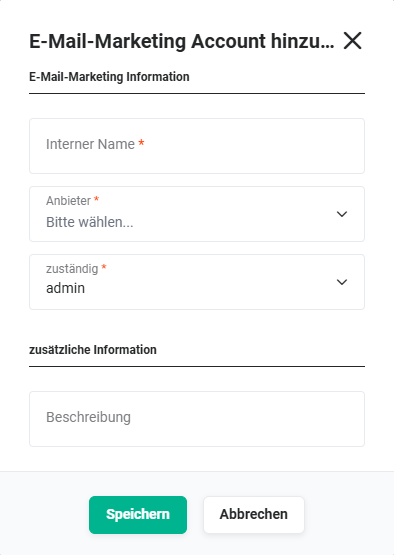 Add Email Marketing Account popup
After clicking the "Save" button, brainX immediately attempts to establish a connection to Inxmail using the entered credentials. If this fails, the following message is displayed: Error establishing the connection. Please check the data entered.
All further settings, importing lists, synchronizing recipients and general operation are described on the parent page Email Marketing.