
Letter Salutation
Package: BASIC
1. General
The automation “1.0 | Letter Salutation Leads & Contacts” automatically creates a value for the field “Letter Salutation” – depending on the fields “Salutation” and “Title” in the respective record of the modules Leads and Contacts.
The field “Letter Salutation” can be used, for example, as a placeholder in PDF Templates or Email Templates.
The automation is part of the brainX delivery and is included in both versions (brainX CRM and brainX APP). On delivery it is deactivated (status inactive).
Layout and Structure
The automation consists of four independent parts, which are described separately:
| Part | Event - Module | Node # |
|---|---|---|
| Part 1 | Record created - Leads | 15–21, 44–47 |
| Part 2 | Record changed - Leads | 23–29, 48–51 |
| Part 3 | Record created - Contacts | 30, 32–37, 52–55 |
| Part 4 | Record changed - Contacts | 31, 38–43, 56–59 |
Each part checks five salutation variants and sets the letter salutation accordingly:
| Salutation | Title present? | Letter Salutation (example) |
|---|---|---|
| Mr | No | Dear Mr Müller |
| Mr | Yes | Dear Dr Müller |
| Mrs | No | Dear Mrs Müller |
| Mrs | Yes | Dear Dr Müller |
| --none-- | – | Dear Sir or Madam |
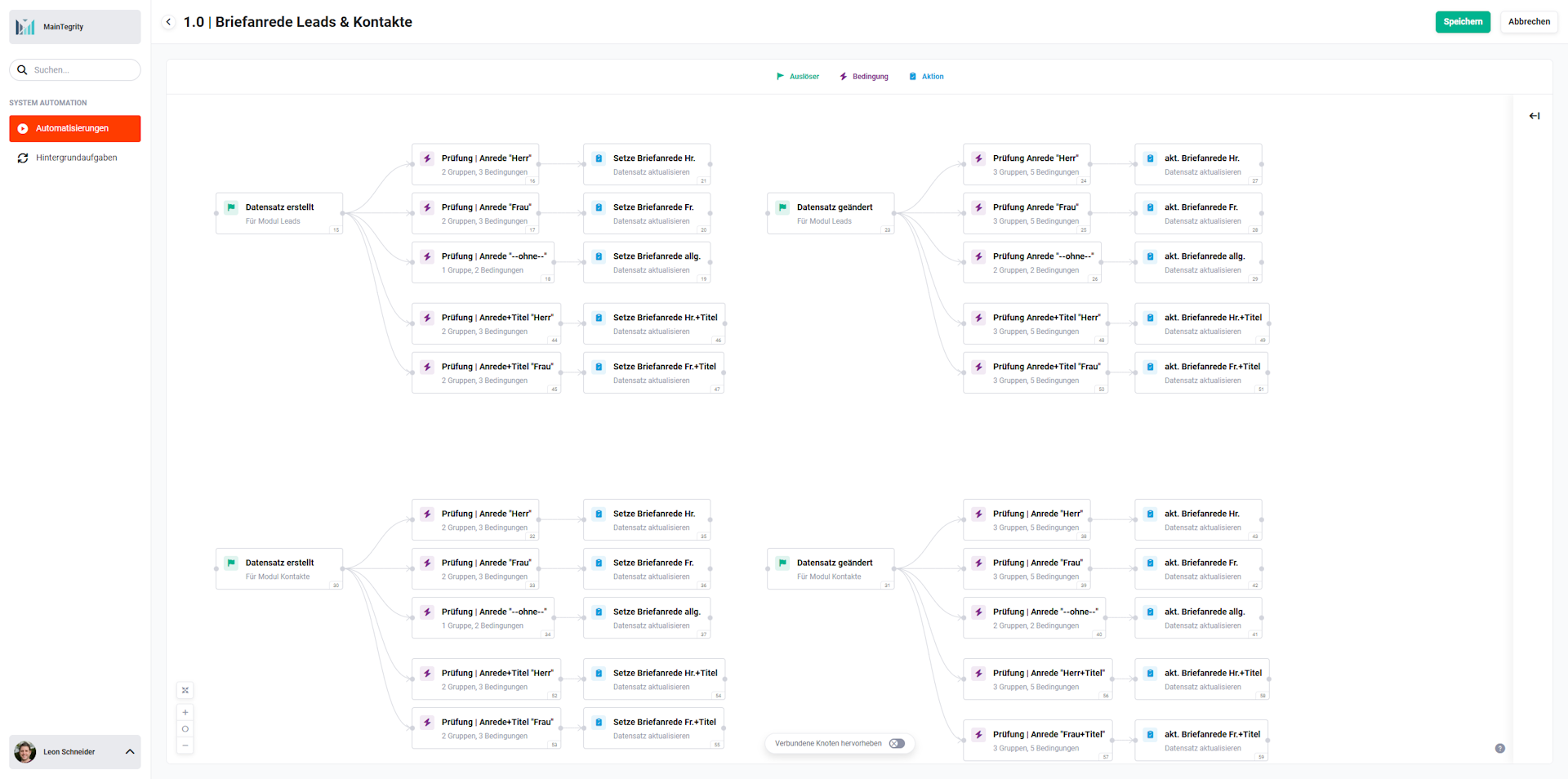 Overview Letter Salutation Leads & Contacts
2. Letter Salutation Leads & Contacts - Triggers, Conditions and Actions
2.1. Record created – Leads
This part of the automation is triggered when a new record is created in the Leads module.
2.1.1. Record created (Trigger - #15)
The trigger is the creation of a record in the Leads module.
Connections to preceding/following nodes:
- before: none
- after:
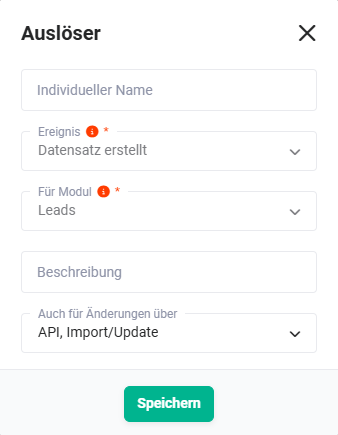 Trigger „Record created" - Leads
2.1.2. Check | Salutation "Mr" (Condition - #16)
The condition checks, using 2 groups and 3 conditions, whether:
- The field Letter Salutation is empty, AND
- The field Salutation has the value Mr, AND
- The field Title is empty
Connections to preceding/following nodes:
- before: Record created (Trigger - #15))
- after: Set Letter Salutation Mr. (Action - #21))
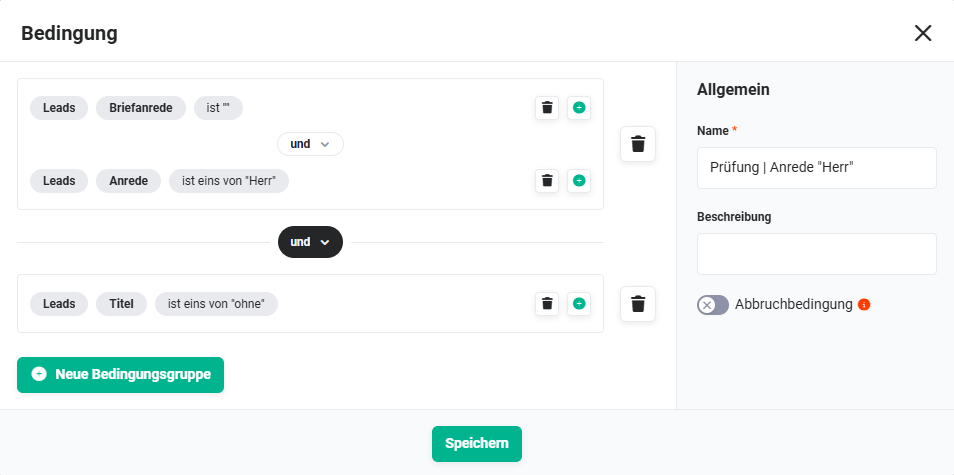 Condition "Check | Salutation Mr" – Leads
2.1.3. Check | Salutation "Mrs" (Condition - #17)
The condition checks, using 2 groups and 3 conditions, whether:
- The field Letter Salutation is empty, AND
- The field Salutation has the value Mrs, AND
- The field Title is empty
Connections to preceding/following nodes:
- before: Record created (Trigger - #15))
- after: Set Letter Salutation Mrs. (Action - #20))
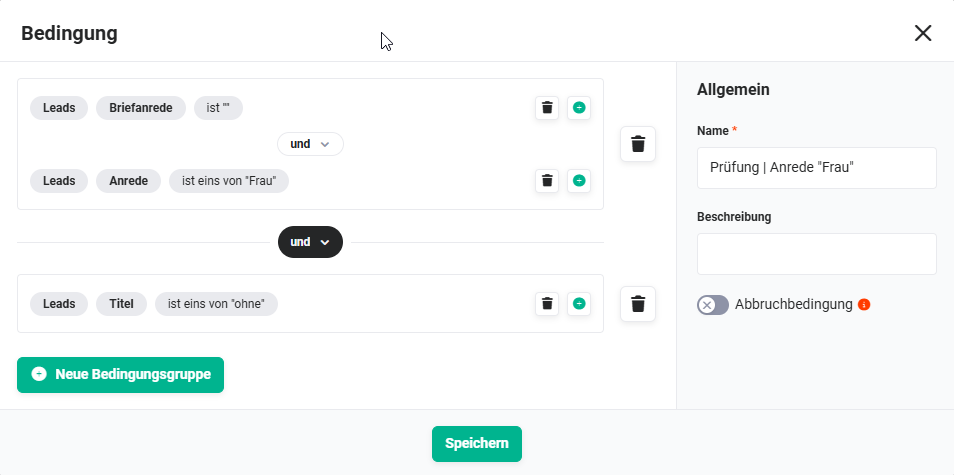 Condition „Check | Salutation Mrs" - Leads
2.1.4. Check | Salutation "--none--" (Condition - #18)
The condition checks, using 1 group and 2 conditions, whether:
- The field Letter Salutation is empty, AND
- The field Salutation has the value --none--
Connections to preceding/following nodes:
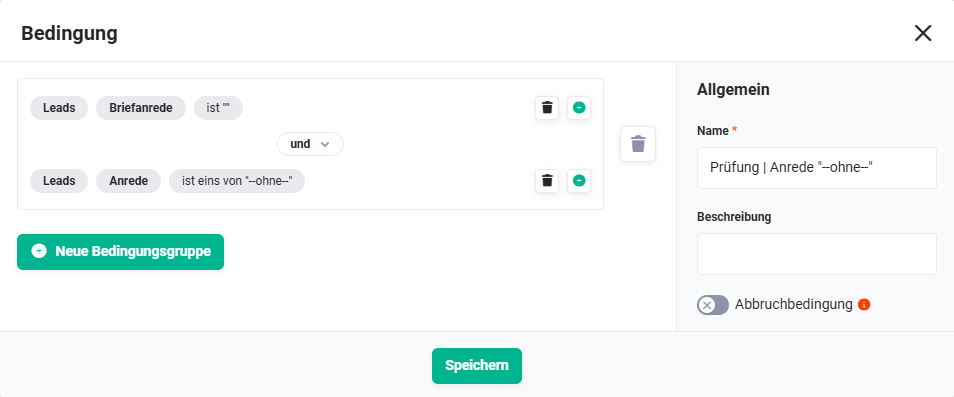 Condition „Check | Salutation --none--" - Leads
2.1.5. Check | Salutation+Title "Mr" (Condition - #44)
The condition checks, using 2 groups and 3 conditions, whether:
- The field Letter Salutation is empty, AND
- The field Salutation has the value Mr, AND
- The field Title is not empty
Connections to preceding/following nodes:
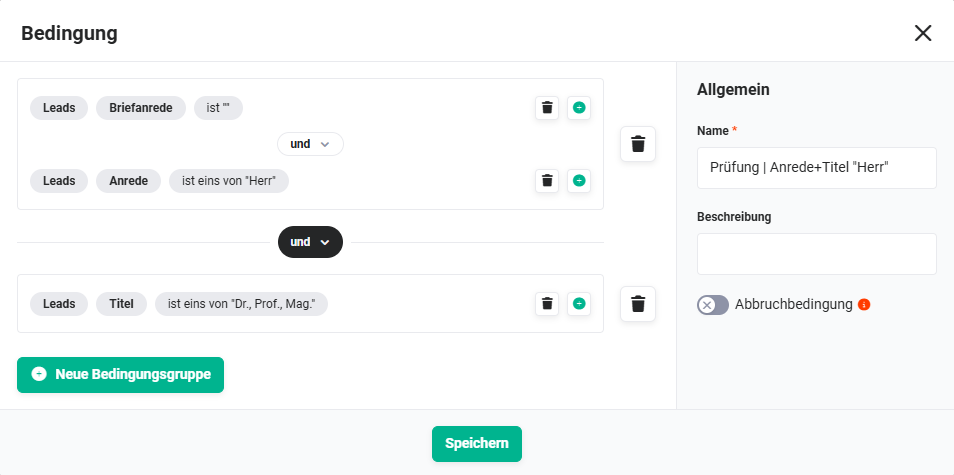 Condition „Check | Salutation+Title Mr" - Leads
2.1.6. Check | Salutation+Title "Mrs" (Condition - #45)
The condition checks, using 2 groups and 3 conditions, whether:
- The field Letter Salutation is empty, AND
- The field Salutation has the value Mrs, AND
- The field Title is not empty
Connections to preceding/following nodes:
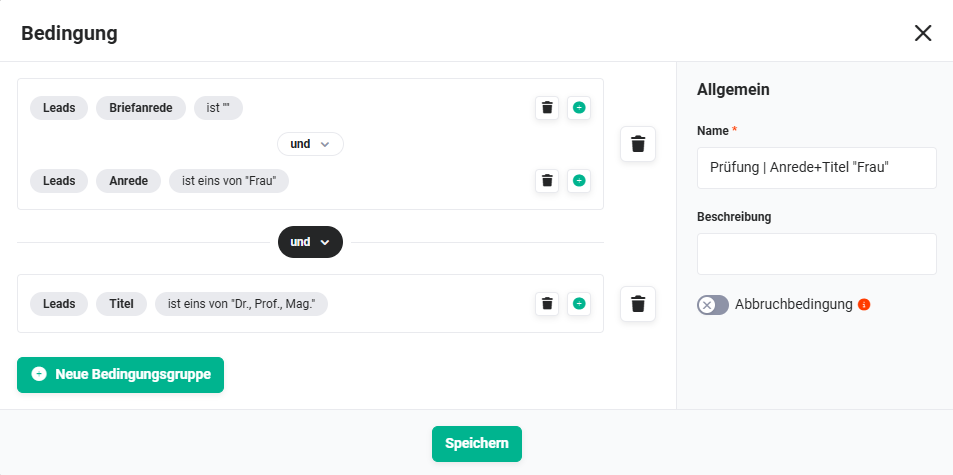 Condition „Check | Salutation+Title Mrs" - Leads
2.1.7. Set Letter Salutation Mr. (Action - #21)
If the conditions are met (Salutation = Mr, no Title), a corresponding value is entered in the Letter Salutation field. For the Letter Salutation field, the Set value functionality (icon "Puzzle") is used.
The letter salutation is composed of the text "Dear Mr " and the surname. Note that the word "Mr" is followed by a space.
Connections to preceding/following nodes:
- before: Check | Salutation "Mr" (Condition - #16))
- after: none
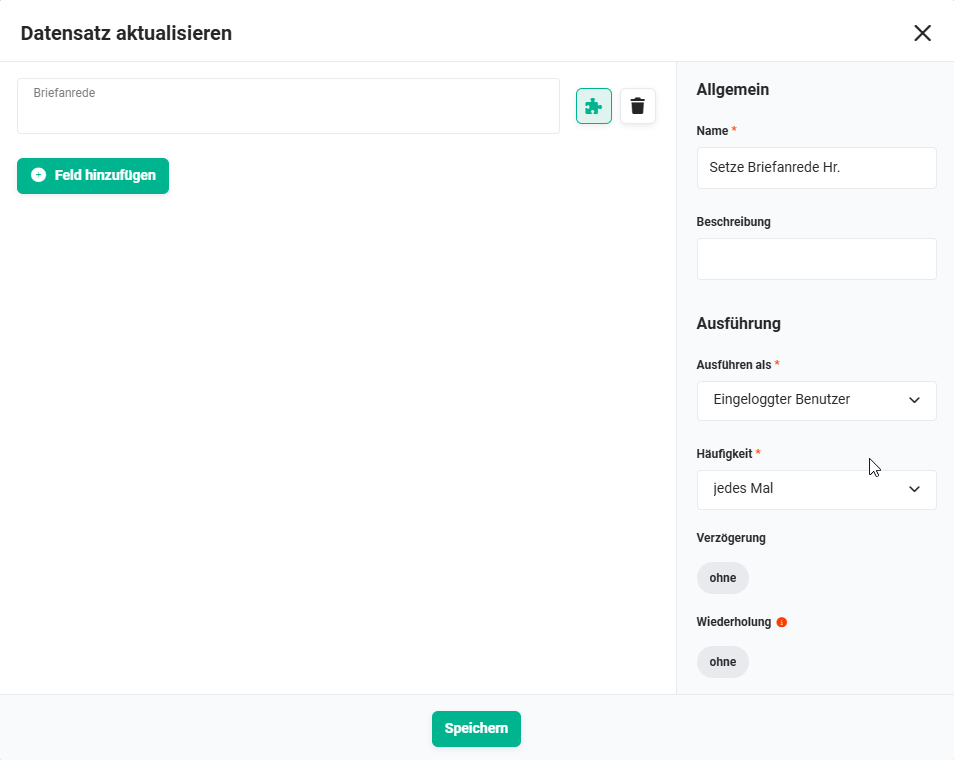 Action „Set Letter Salutation Mr." - Leads
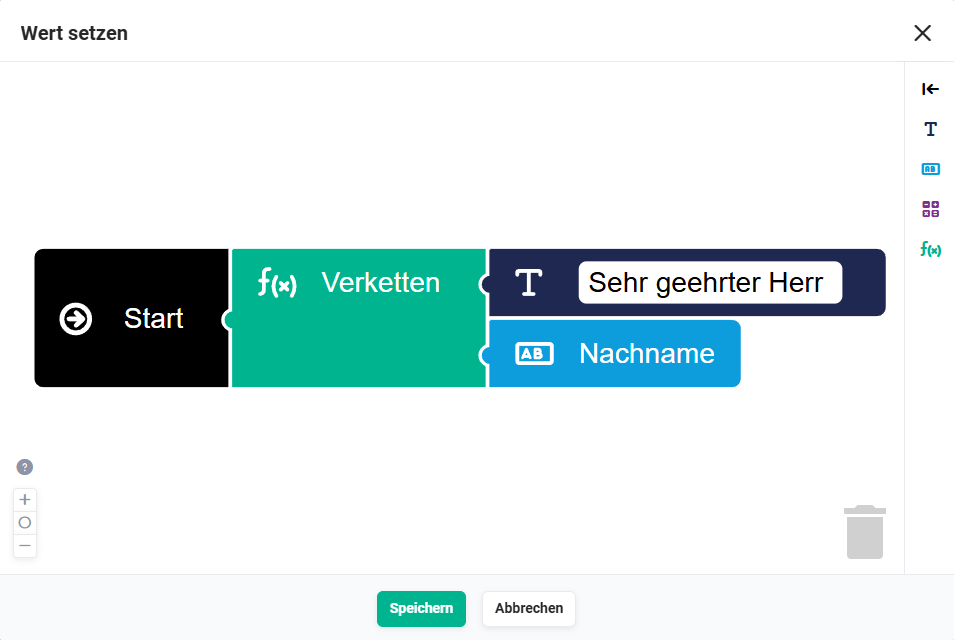 Action „Set Letter Salutation Mr." - Set value - Leads
2.1.8. Set Letter Salutation Mrs. (Action - #20)
If the conditions are met (Salutation = Mrs, no Title), a corresponding value is entered in the Letter Salutation field.
The letter salutation is composed of the text "Dear Mrs " and the surname. Note that the word "Mrs" is followed by a space.
Connections to preceding/following nodes:
- before: Check | Salutation "Mrs" (Condition - #17))
- after: none
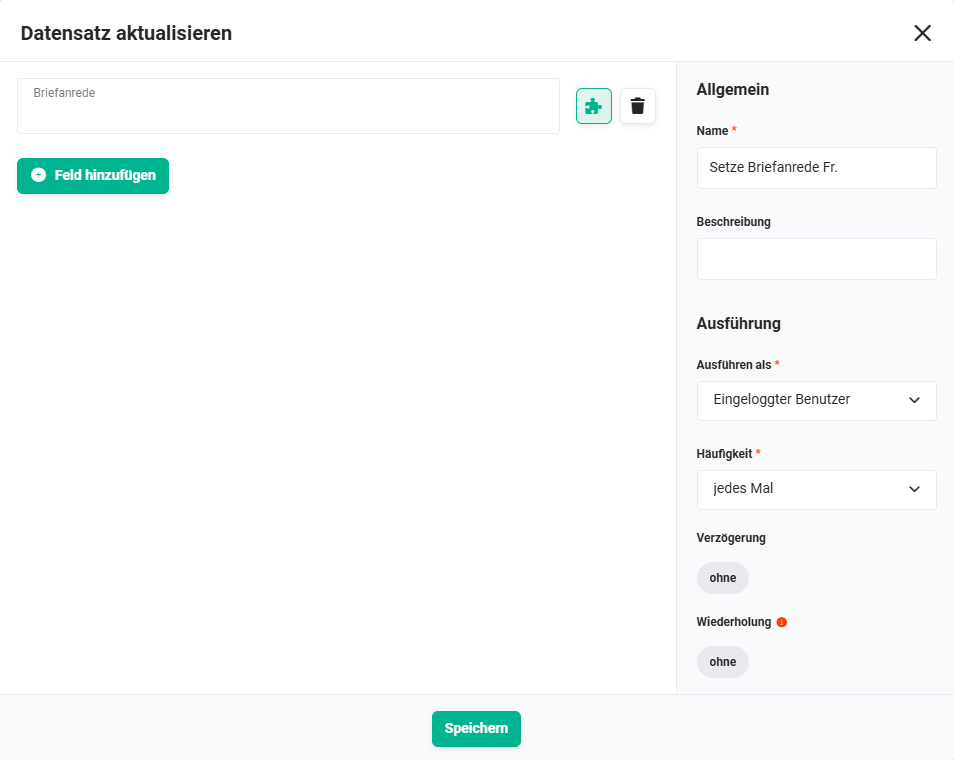 Action „Set Letter Salutation Mrs." - Leads
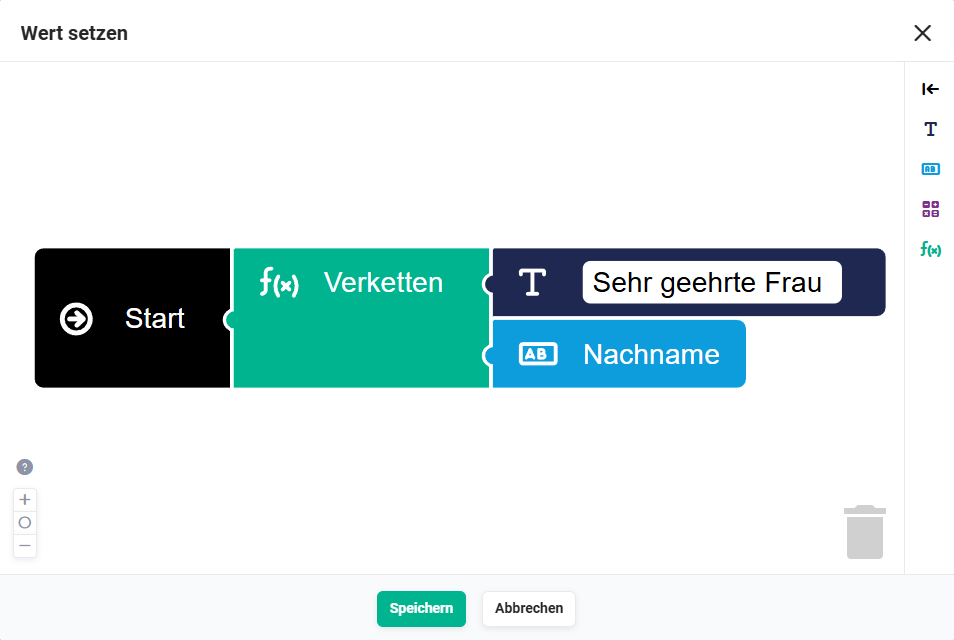 Action „Set Letter Salutation Mrs." - Set value - Leads
2.1.9. Set Letter Salutation general (Action - #19)
If the conditions are met (Salutation = --none--), the static text "Dear Sir or Madam " is entered in the Letter Salutation field. Note that the word "Madam" is followed by a space. Here the Set value functionality is not used; instead, a static text is entered directly.
Connections to preceding/following nodes:
- before: Check | Salutation "--none--" (Condition - #18))
- after: none
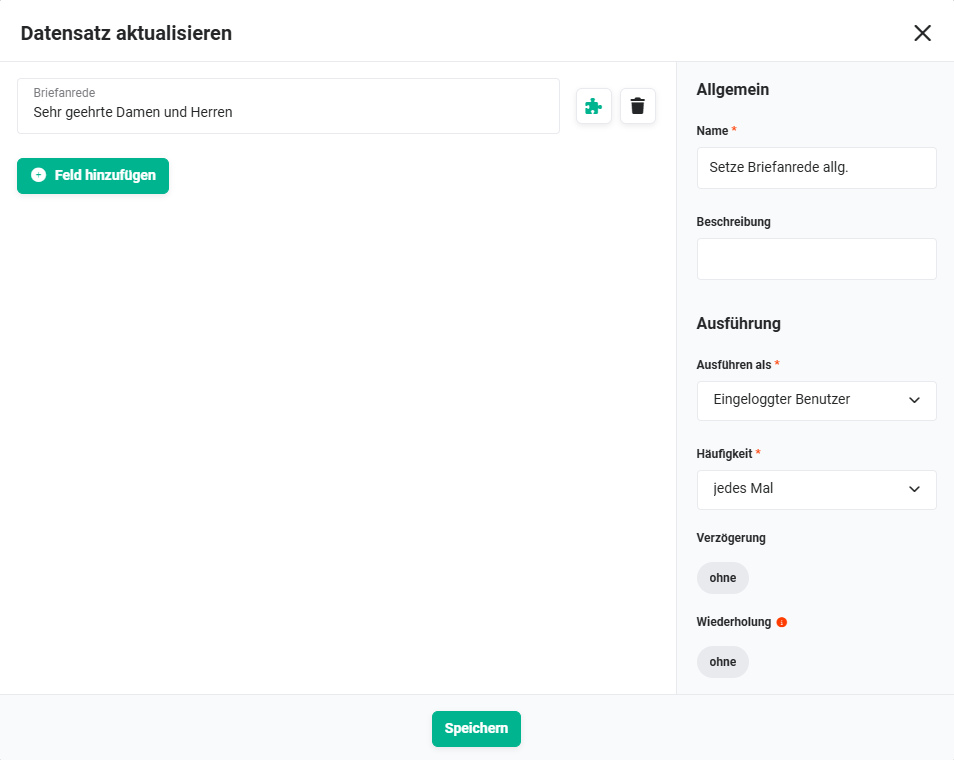 Action „Set Letter Salutation general" - Leads
2.1.10. Set Letter Salutation Mr.+Title (Action - #46)
If the conditions are met (Salutation = Mr, Title present), a value that includes the title is entered in the Letter Salutation field.
The letter salutation is composed of the text "Dear Mr ", the title and the surname (e.g. "Dear Dr Müller").
Connections to preceding/following nodes:
- before: Check | Salutation+Title "Mr" (Condition - #44))
- after: none
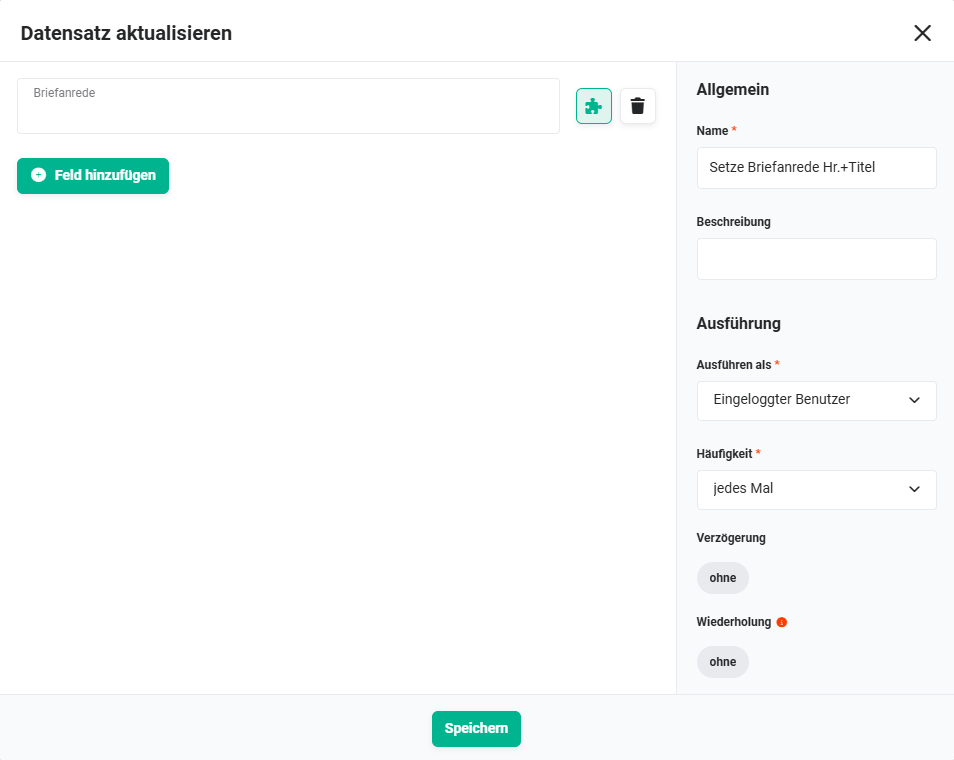 Action „Set Letter Salutation Mr.+Title" - Leads
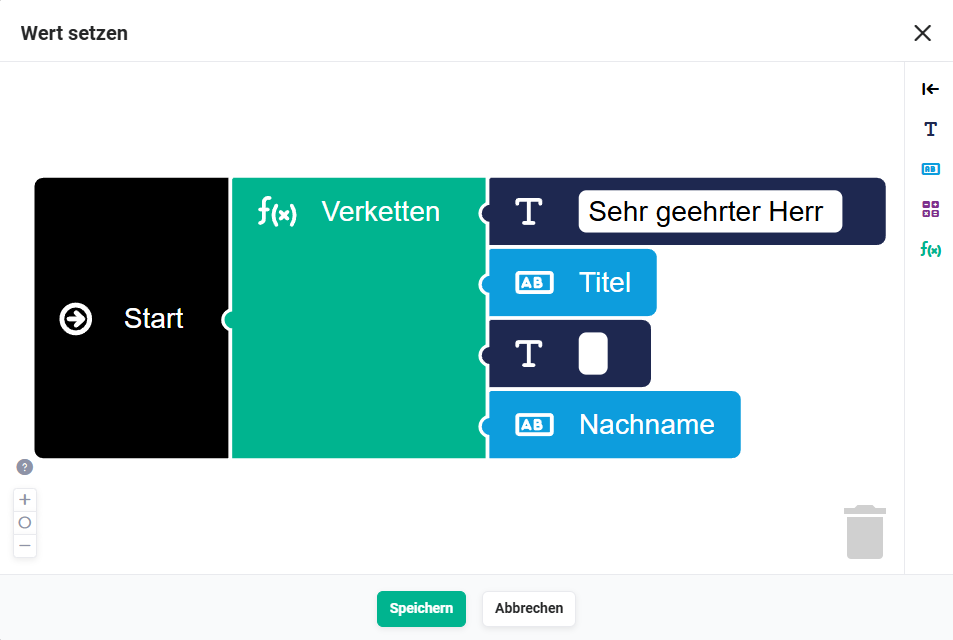 Action „Set Letter Salutation Mr.+Title" - Set value - Leads
2.1.11. Set Letter Salutation Mrs.+Title (Action - #47)
If the conditions are met (Salutation = Mrs, Title present), a value that includes the title is entered in the Letter Salutation field.
The letter salutation is composed of the text "Dear Mrs ", the title and the surname (e.g. "Dear Dr Müller").
Connections to preceding/following nodes:
- before: Check | Salutation+Title "Mrs" (Condition - #45))
- after: none
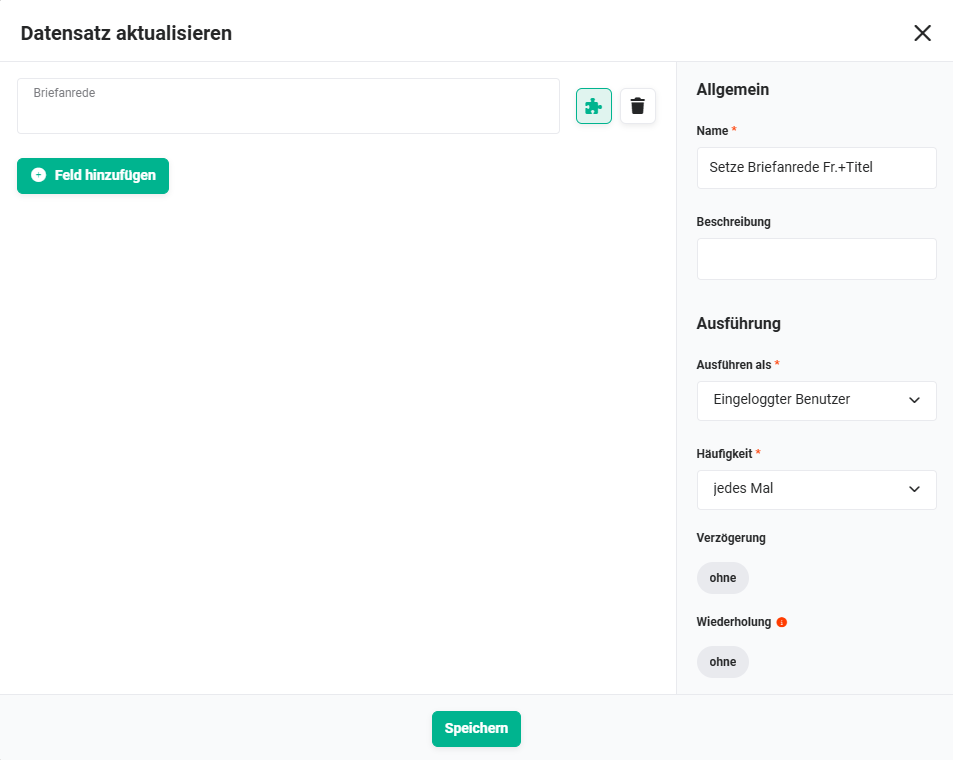 Action „Set Letter Salutation Mrs.+Title" - Leads
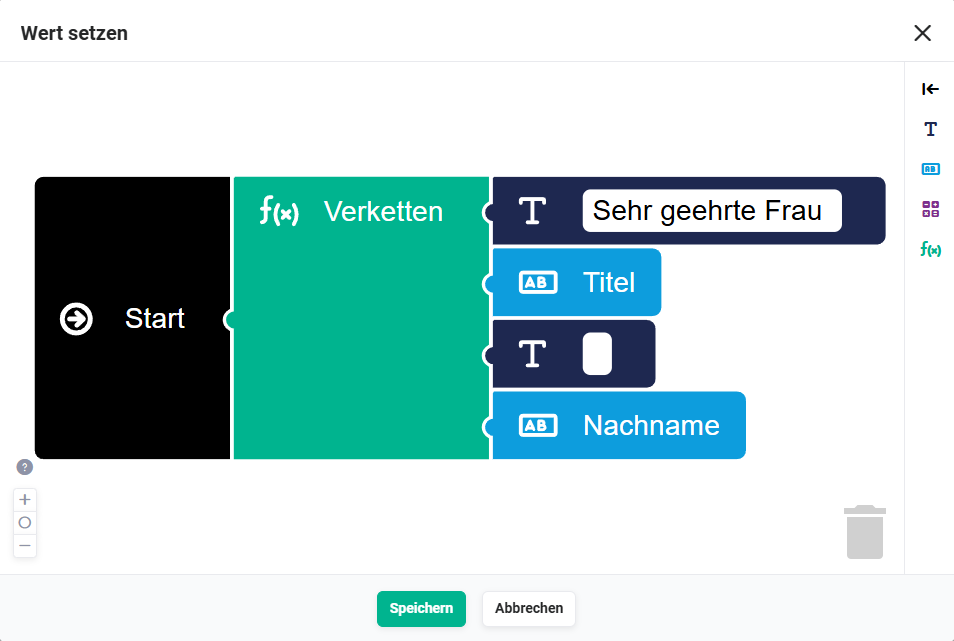 Action „Set Letter Salutation Mr.+Title" - Set value - Leads
2.2. Record changed – Leads
This part is triggered when the Salutation or Surname field is changed in an existing lead record, and updates the letter salutation accordingly.
2.2.1. Record changed (Trigger - #23)
The trigger is the change of a record in the Leads module.
Connections to preceding/following nodes:
- before: none
- after:
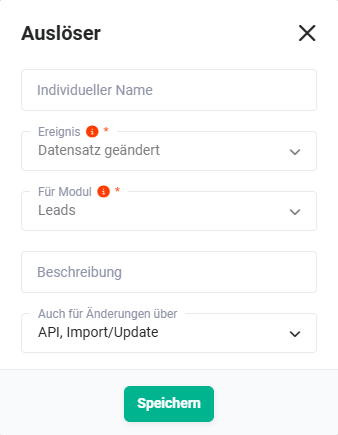 Trigger „Record changed" - Leads
2.2.2. Check Salutation "Mr" (Condition - #24)
The condition checks, using 3 groups and 5 conditions, whether:
- The field Salutation has the value Mr, AND
- The field Title is empty, AND
- The field Salutation or Surname has changed
Connections to preceding/following nodes:
- before: Record changed (Trigger - #23))
- after: upd. Letter Salutation Mr. (Action - #27))
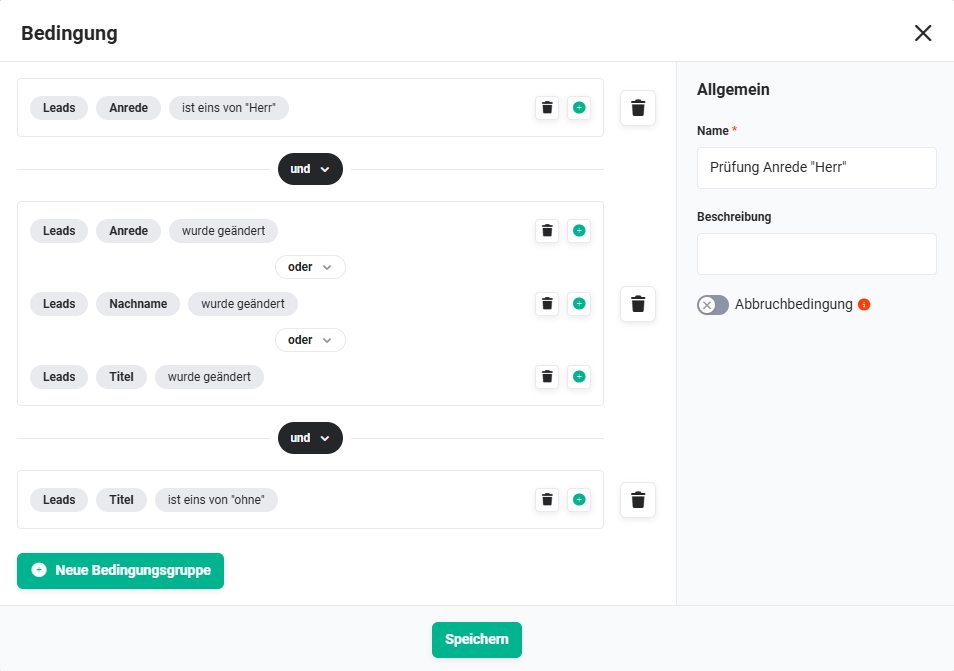 Condition „Check Salutation Mr" - Leads
2.2.3. Check Salutation "Mrs" (Condition - #25)
The condition checks, using 3 groups and 5 conditions, whether:
- The field Salutation has the value Mrs, AND
- The field Title is empty, AND
- The field Salutation or Surname has changed
Connections to preceding/following nodes:
- before: Record changed (Trigger - #23))
- after: upd. Letter Salutation Mrs. (Action - #28))
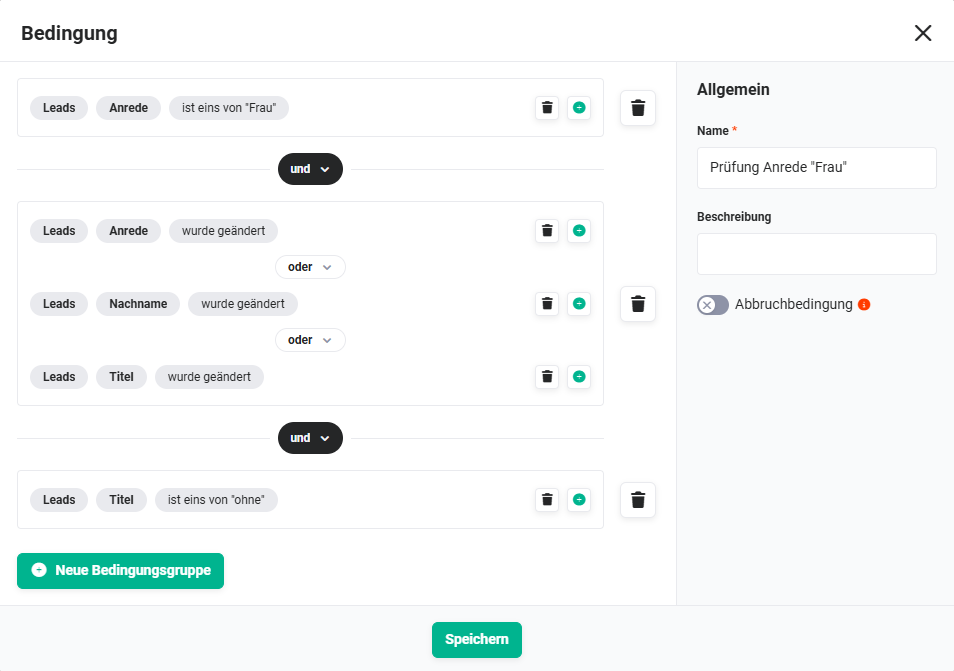 Condition „Check Salutation Mrs" - Leads
2.2.4. Check Salutation "--none--" (Condition - #26)
The condition checks, using 3 groups and 5 conditions, whether:
- The field Salutation has the value --none--, AND
- The field Salutation has changed
Connections to preceding/following nodes:
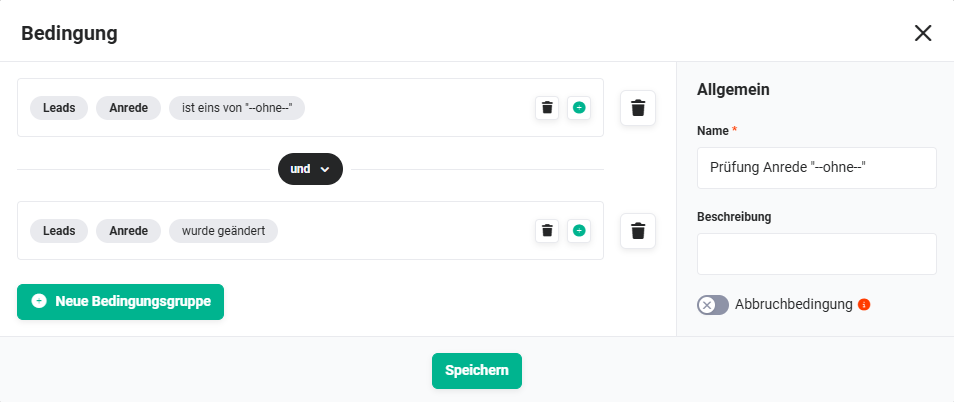 Condition „Check Salutation --none--" - Leads
2.2.5. Check Salutation+Title "Mr" (Condition - #48)
The condition checks, using 3 groups and 5 conditions, whether:
- The field Salutation has the value Mr, AND
- The field Title is not empty, AND
- The field Salutation, Surname or Title has changed
Connections to preceding/following nodes:
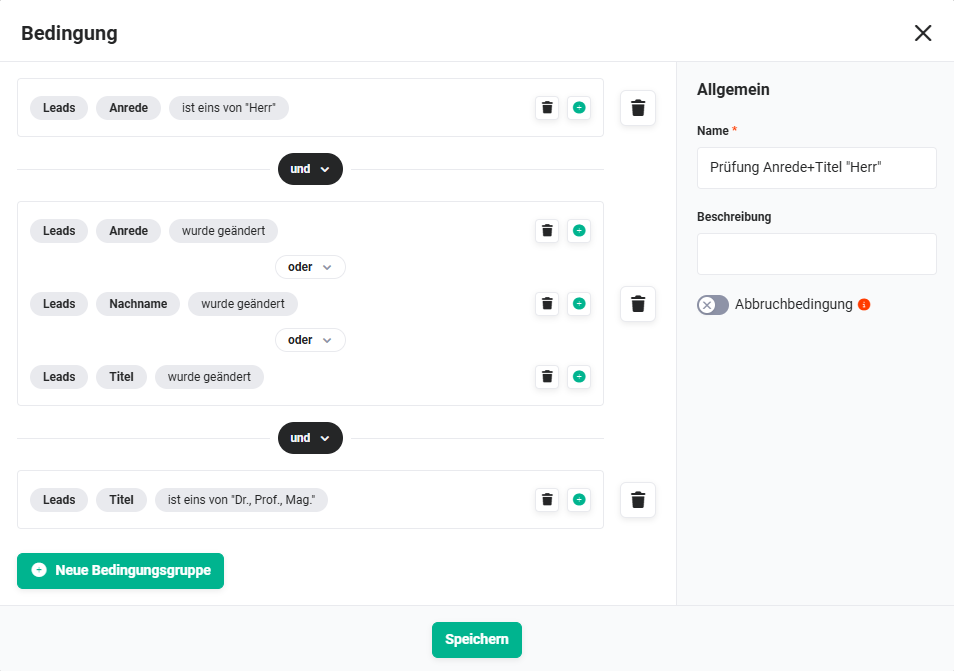 Condition „Check Salutation+Title Mr" - Leads
2.2.6. Check Salutation+Title "Mrs" (Condition - #50)
The condition checks, using 3 groups and 5 conditions, whether:
- The field Salutation has the value Mrs, AND
- The field Title is not empty, AND
- The field Salutation, Surname or Title has changed
Connections to preceding/following nodes:
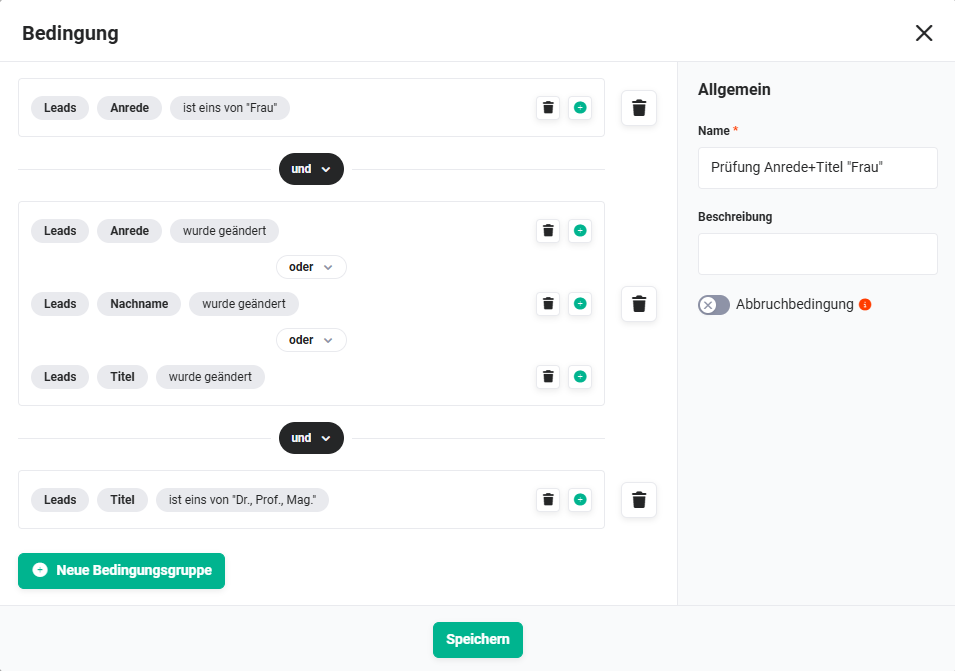 Condition „Check Salutation+Title Mrs" - Leads
2.2.7. upd. Letter Salutation Mr. (Action - #27)
If the conditions are met, the letter salutation is updated to "Dear Mr [Surname]".
Connections to preceding/following nodes:
- before: Check Salutation "Mr" (Condition - #24))
- after: none
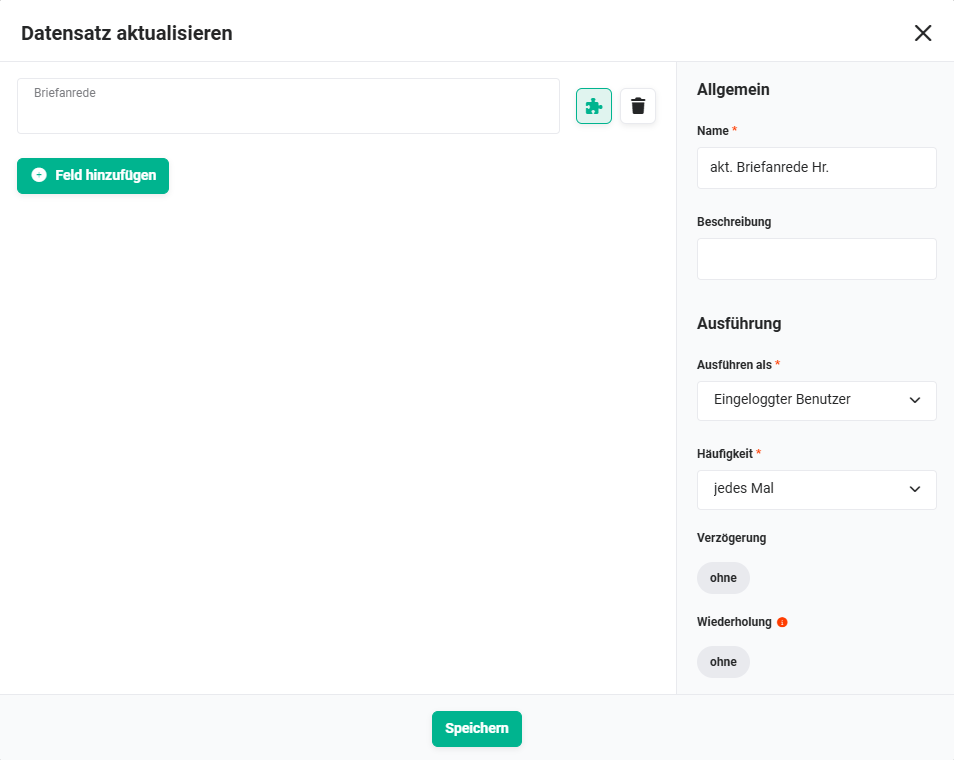 Action „upd. Letter Salutation Mr." - Leads
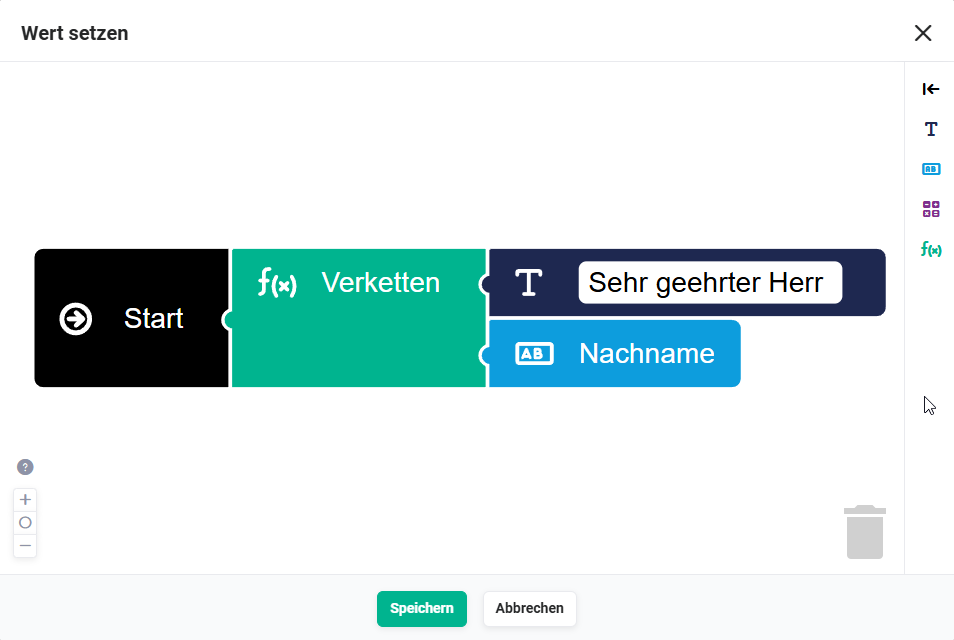 Action „upd. Letter Salutation Mr." - Set value - Leads
2.2.8. upd. Letter Salutation Mrs. (Action - #28)
If the conditions are met, the letter salutation is updated to "Dear Mrs [Surname]".
Connections to preceding/following nodes:
- before: Check Salutation "Mrs" (Condition - #25))
- after: none
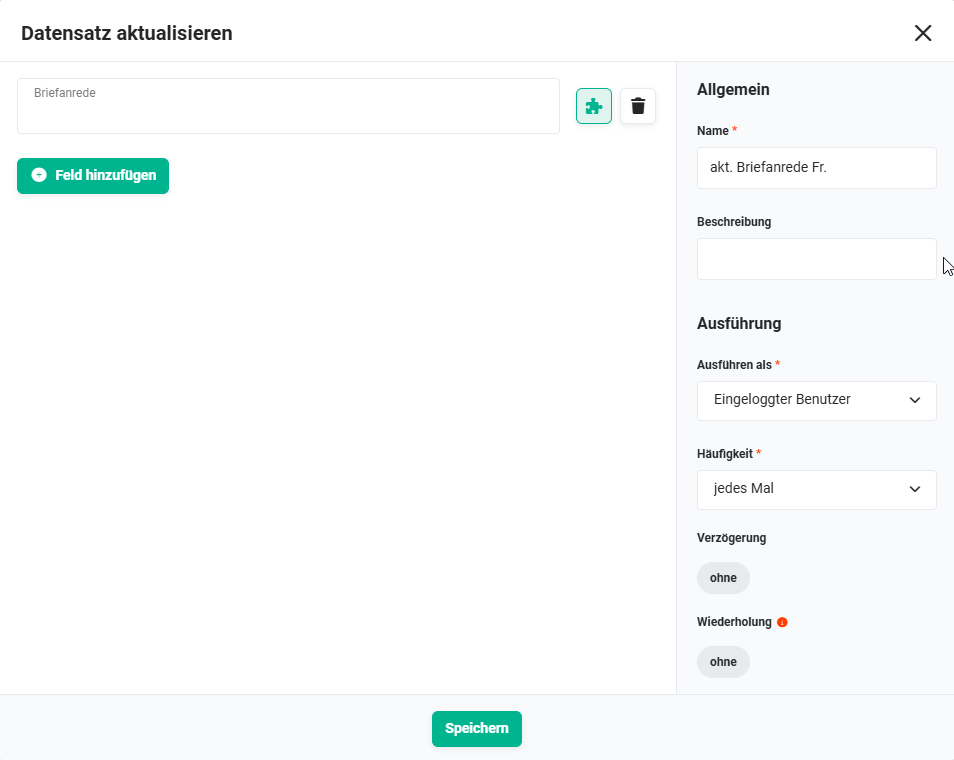 Action „upd. Letter Salutation Mrs." - Leads
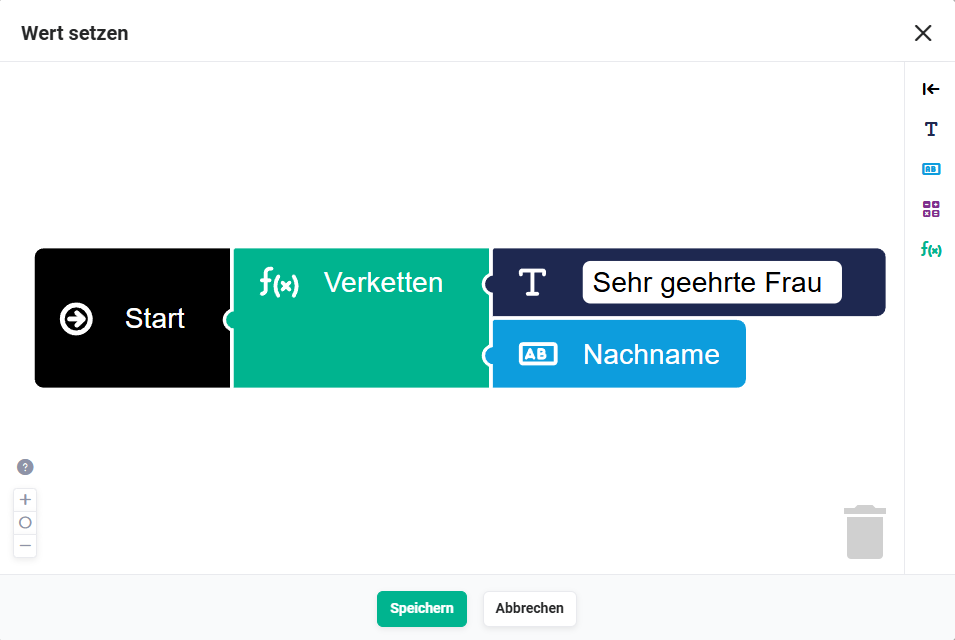 Action „upd. Letter Salutation Mrs." - Set value - Leads
2.2.9. upd. Letter Salutation general (Action - #29)
If the conditions are met, the letter salutation is updated to "Dear Sir or Madam ".
Connections to preceding/following nodes:
- before: Check Salutation "--none--" (Condition - #26))
- after: none
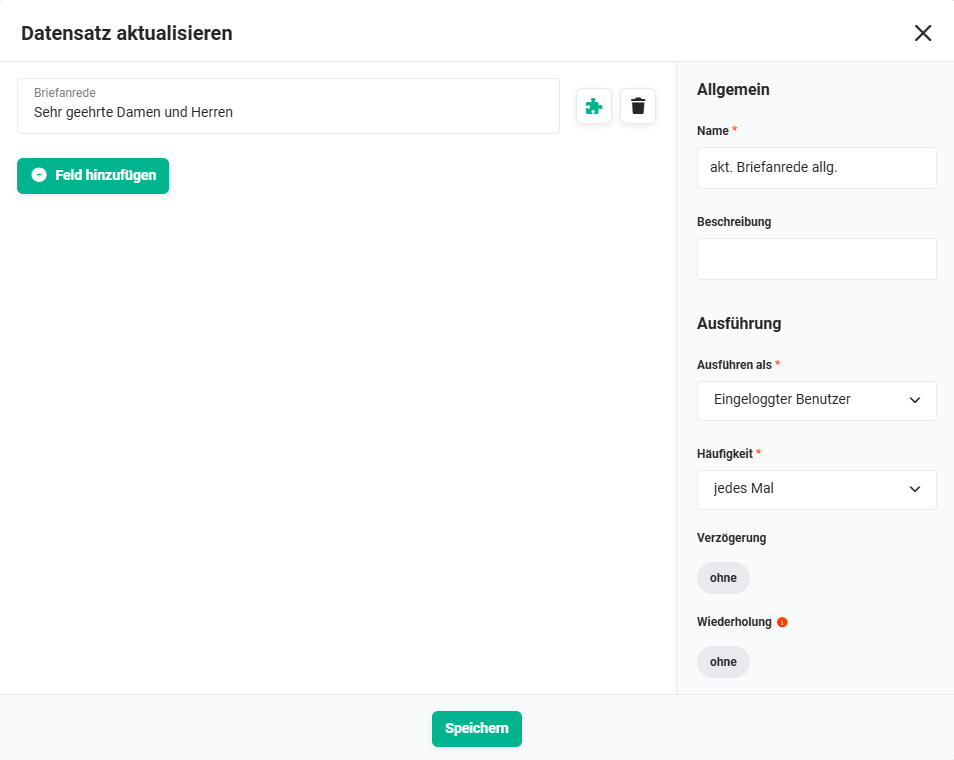 Action „upd. Letter Salutation general" - Leads
2.2.10. upd. Letter Salutation Mr.+Title (Action - #49)
If the conditions are met, the letter salutation is updated to "Dear Mr [Title] [Surname]".
Connections to preceding/following nodes:
- before: Check Salutation+Title "Mr" (Condition - #48))
- after: none
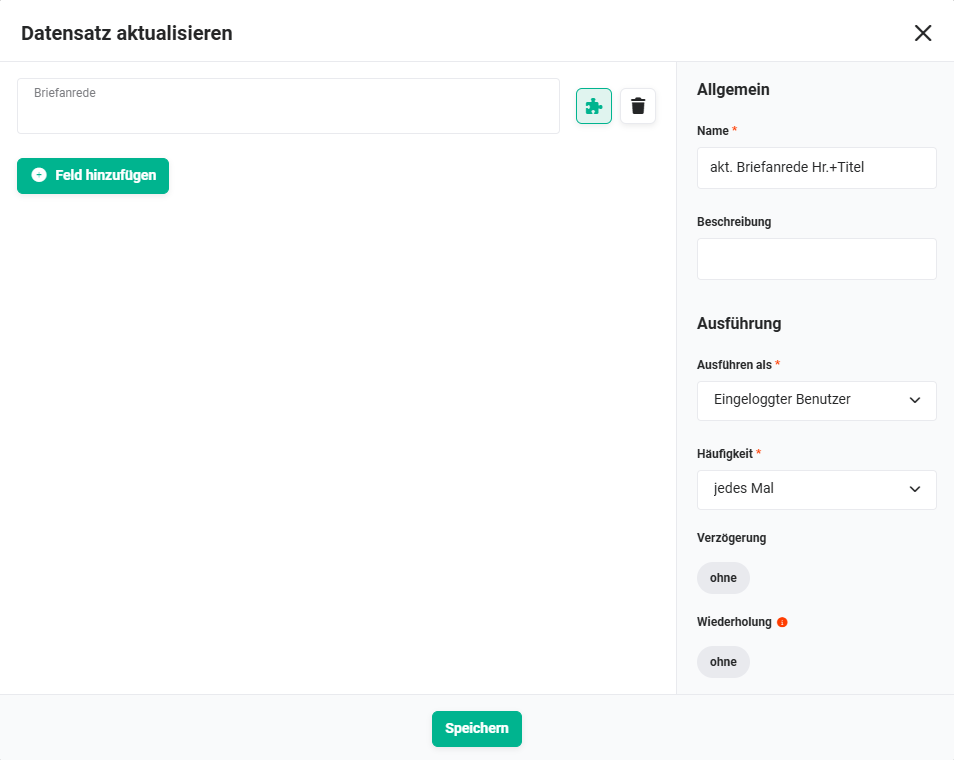 Action „upd. Letter Salutation Mr.+Title" - Leads
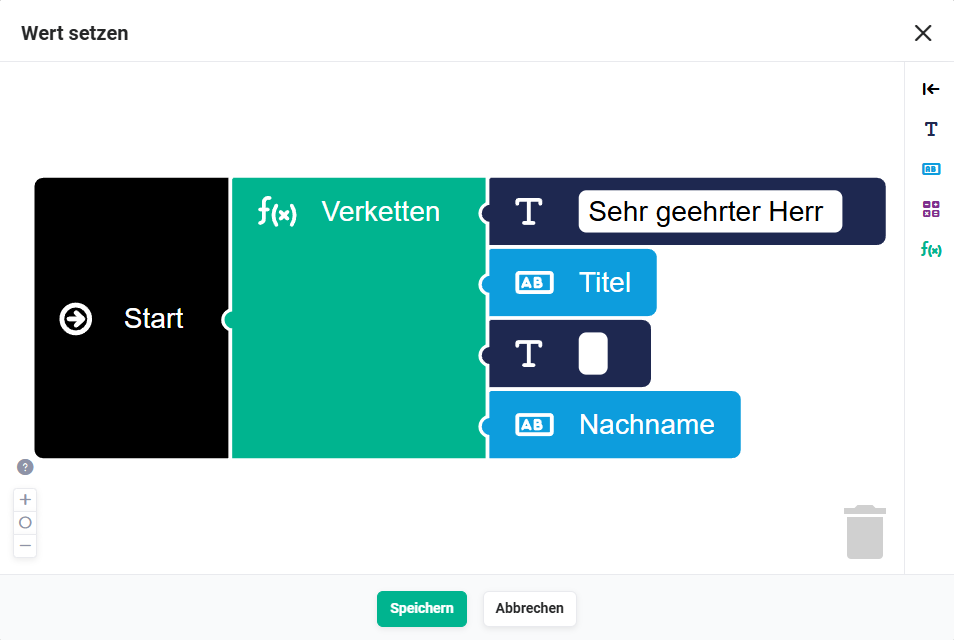 Action „upd. Letter Salutation Mr.+Title" - Set value - Leads
2.2.11. upd. Letter Salutation Mrs.+Title (Action - #51)
If the conditions are met, the letter salutation is updated to "Dear Mrs [Title] [Surname]".
Connections to preceding/following nodes:
- before: Check Salutation+Title "Mrs" (Condition - #50))
- after: none
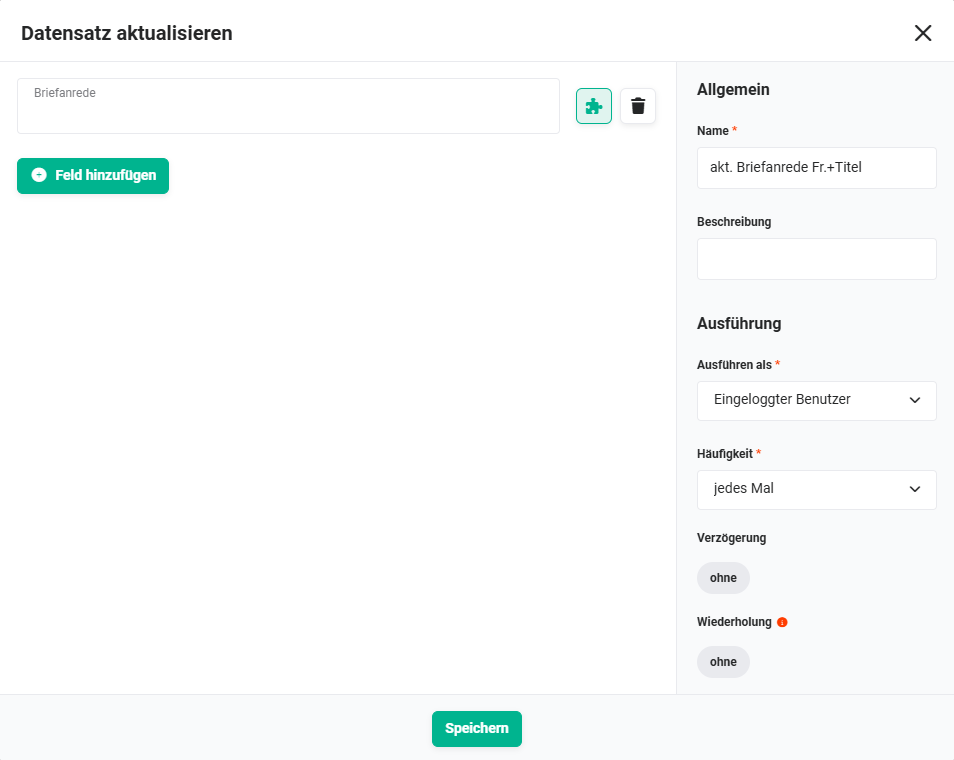 Action „upd. Letter Salutation Mrs.+Title" - Leads
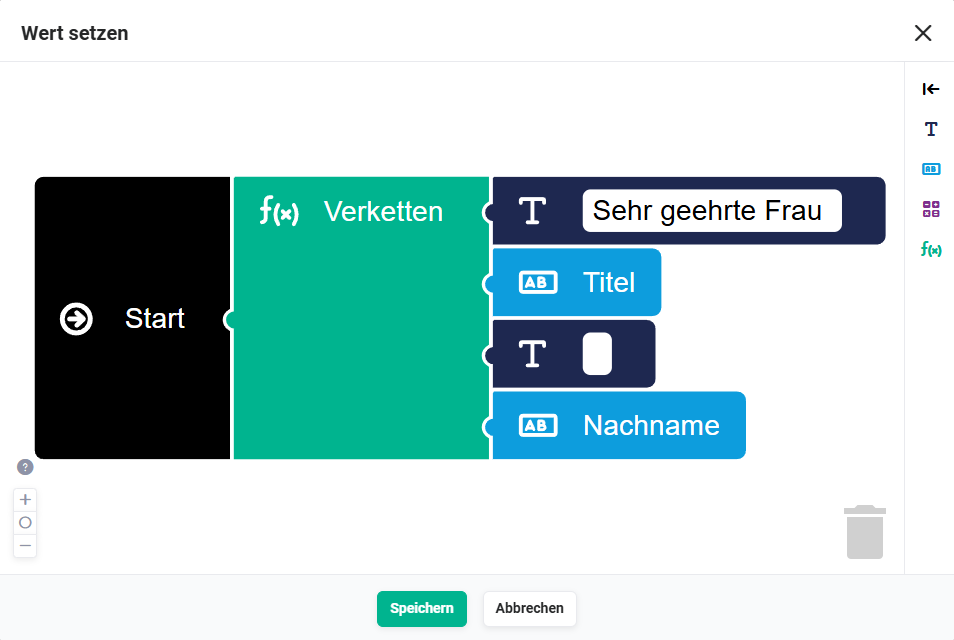 Action „upd. Letter Salutation Mrs.+Title" - Set value - Leads
2.3. Record created – Contacts
This part corresponds in layout and logic exactly to Part 1 - Record created - Leads, but refers to the Contacts module.
No separate screenshots are available for the section Record created – Contacts, since the layout and configuration of the nodes are identical to the corresponding sections for the Leads module. Only the module in the triggers and conditions differs. The screenshots of section 2.1. Record created – Leads can be used as a reference accordingly.
2.3.1. Record created (Trigger - #30)
The trigger is the creation of a record in the Contacts module.
Connections to preceding/following nodes:
- before: none
- after:
2.3.2. Check | Salutation "Mr" (Condition - #32)
Corresponds to #16 Part 1 - Record created - Leads (2 groups, 3 conditions: Letter Salutation empty, Salutation = Mr, Title empty).
Connections to preceding/following nodes:
- before: Record created (Trigger - #30))
- after: Set Letter Salutation Mr. (Action - #35))
2.3.3. Check | Salutation "Mrs" (Condition - #33)
Corresponds to #17 Part 1 - Record created - Leads (2 groups, 3 conditions: Letter Salutation empty, Salutation = Mrs, Title empty).
Connections to preceding/following nodes:
- before: Record created (Trigger - #30))
- after: Set Letter Salutation Mrs. (Action - #36))
2.3.4. Check | Salutation "--none--" (Condition - #34)
Corresponds to #18 Part 1 - Record created - Leads (1 group, 2 conditions: Letter Salutation empty, Salutation = --none--).
Connections to preceding/following nodes:
2.3.5. Check | Salutation+Title "Mr" (Condition - #52)
Corresponds to #44 Part 1 - Record created - Leads (2 groups, 3 conditions: Letter Salutation empty, Salutation = Mr, Title not empty).
Connections to preceding/following nodes:
2.3.6. Check | Salutation+Title "Mrs" (Condition - #53)
Corresponds to #45 Part 1 - Record created - Leads (2 groups, 3 conditions: Letter Salutation empty, Salutation = Mrs, Title not empty).
Connections to preceding/following nodes:
2.3.7. Set Letter Salutation Mr. (Action - #35)
Corresponds to #21 Part 1 - Record created - Leads: Letter Salutation = "Dear Mr [Surname]"
Connections to preceding/following nodes:
- before: Check | Salutation "Mr" (Condition - #32))
- after: none
2.3.8. Set Letter Salutation Mrs. (Action - #36)
Corresponds to #20 Part 1 - Record created - Leads: Letter Salutation = "Dear Mrs [Surname]"
Connections to preceding/following nodes:
- before: Check | Salutation "Mrs" (Condition - #33))
- after: none
2.3.9. Set Letter Salutation general (Action - #37)
Corresponds to #19 Part 1 - Record created - Leads: Letter Salutation = "Dear Sir or Madam "
Connections to preceding/following nodes:
- before: Check | Salutation "--none--" (Condition - #34))
- after: none
2.3.10. Set Letter Salutation Mr.+Title (Action - #54)
Corresponds to #46 Part 1 - Record created - Leads: Letter Salutation = "Dear Mr [Title] [Surname]"
Connections to preceding/following nodes:
- before: Check | Salutation+Title "Mr" (Condition - #52))
- after: none
2.3.11. Set Letter Salutation Mrs.+Title (Action - #55)
Corresponds to #47 Part 1 - Record created - Leads: Letter Salutation = "Dear Mrs [Title] [Surname]"
Connections to preceding/following nodes:
- before: Check | Salutation+Title "Mrs" (Condition - #53))
- after: none
2.4. Record changed – Contacts
This part corresponds in layout and logic exactly to Part 2 - Record changed - Leads, but refers to the Contacts module.
No separate screenshots are available for the section Record changed – Contacts, since the layout and configuration of the nodes are identical to the corresponding sections for the Leads module. Only the module in the triggers and conditions differs. The screenshots of section 2.2. Record changed – Leads can be used as a reference accordingly.
2.4.1. Record changed (Trigger - #31)
The trigger is the change of a record in the Contacts module.
Connections to preceding/following nodes:
- before: none
- after:
2.4.2. Check | Salutation "Mr" (Condition - #38)
Corresponds to #24 Part 2 - Record changed - Leads (3 groups, 5 conditions: Salutation = Mr, Title empty, Salutation/Surname changed).
Connections to preceding/following nodes:
- before: Record changed (Trigger - #31))
- after: upd. Letter Salutation Mr. (Action - #43))
2.4.3. Check | Salutation "Mrs" (Condition - #39)
Corresponds to #25 Part 2 - Record changed - Leads (3 groups, 5 conditions: Salutation = Mrs, Title empty, Salutation/Surname changed).
Connections to preceding/following nodes:
- before: Record changed (Trigger - #31))
- after: upd. Letter Salutation Mrs. (Action - #42))
2.4.4. Check | Salutation "--none--" (Condition - #40)
Corresponds to #26 Part 2 - Record changed - Leads (3 groups, 5 conditions: Salutation = --none--, Salutation changed).
Connections to preceding/following nodes:
2.4.5. Check | Salutation "Mr+Title" (Condition - #56)
Corresponds to #48 Part 2 - Record changed - Leads (3 groups, 5 conditions: Salutation = Mr, Title not empty, Salutation/Surname/Title changed).
Connections to preceding/following nodes:
2.4.6. Check | Salutation "Mrs+Title" (Condition - #57)
Corresponds to #50 Part 2 - Record changed - Leads (3 groups, 5 conditions: Salutation = Mrs, Title not empty, Salutation/Surname/Title changed).
Connections to preceding/following nodes:
2.4.7. upd. Letter Salutation Mr. (Action - #43)
Updates the letter salutation to "Dear Mr [Surname]".
Connections to preceding/following nodes:
- before: Check | Salutation "Mr" (Condition - #38))
- after: none
2.4.8. upd. Letter Salutation Mrs. (Action - #42)
Updates the letter salutation to "Dear Mrs [Surname]".
Connections to preceding/following nodes:
- before: Check | Salutation "Mrs" (Condition - #39))
- after: none
2.4.9. upd. Letter Salutation general (Action - #41)
Updates the letter salutation to "Dear Sir or Madam ".
Connections to preceding/following nodes:
- before: Check | Salutation "--none--" (Condition - #40))
- after: none
2.4.10. upd. Letter Salutation Mr.+Title (Action - #58)
Updates the letter salutation to "Dear Mr [Title] [Surname]".
Connections to preceding/following nodes:
- before: Check | Salutation "Mr+Title" (Condition - #56))
- after: none
2.4.11. upd. Letter Salutation Mrs.+Title (Action - #59)
Updates the letter salutation to "Dear Mrs [Title] [Surname]".
Connections to preceding/following nodes:
- before: Check | Salutation "Mrs+Title" (Condition - #57))
- after: none