
Billing - Dunning Process
Package: BASIC
1. General
The automation “7.0 | Billing – Dunning Process" monitors open invoices and, if payment fails to arrive, automatically issues up to three payment reminders (PR). The stages build sequentially on one another.
The automation is part of the brainX delivery and is included in both versions (brainX CRM and brainX APP). On delivery it is deactivated (status inactive).
A detailed description of the automation “7.0 | Billing - Dunning Process” is available in the video brainX Projektabrechnung von A bis Z – Abschläge, Schlussrechnung & Mahnlauf | Deep Dive Part 5 on the brainX YouTube channel.
Composition and Structure
The automation consists of two triggers and several condition and action strands:
| Node no. | Name | Type |
|---|---|---|
| #1 | Dunning sequence | Trigger (Invoices module) |
| #2 | Invoice open? | Condition (1 group, 3 conditions) |
| #3 | Sends 1st PR (external) | Action – Send email |
| #4 | Update PR information | Action – Update record |
| #6 | Sends 2nd PR (external) | Action – Send email |
| #7 | Update M2 information | Action – Update record |
| #8 | Sends 3rd PR (external) | Action – Send email |
| #9 | Update 3rd PR | Action – Update record |
| #13) | Invoice is saved | Trigger (Invoices module) |
| #14 | Info to accounting before 2nd PR | Action – Send notification |
| #16 | Info to accounting before 3rd PR | Action – Send notification |
| #19 | Invoice open after PR? | Condition (1 group, 4 conditions) |
| #20 | Invoice open 2nd PR? | Condition (1 group, 4 conditions) |
| #21 | Insert dunning fee | Action – Add line item |
| #22 | Invoice open? | Condition (1 group, 1 condition) |
Overall overview of the automation
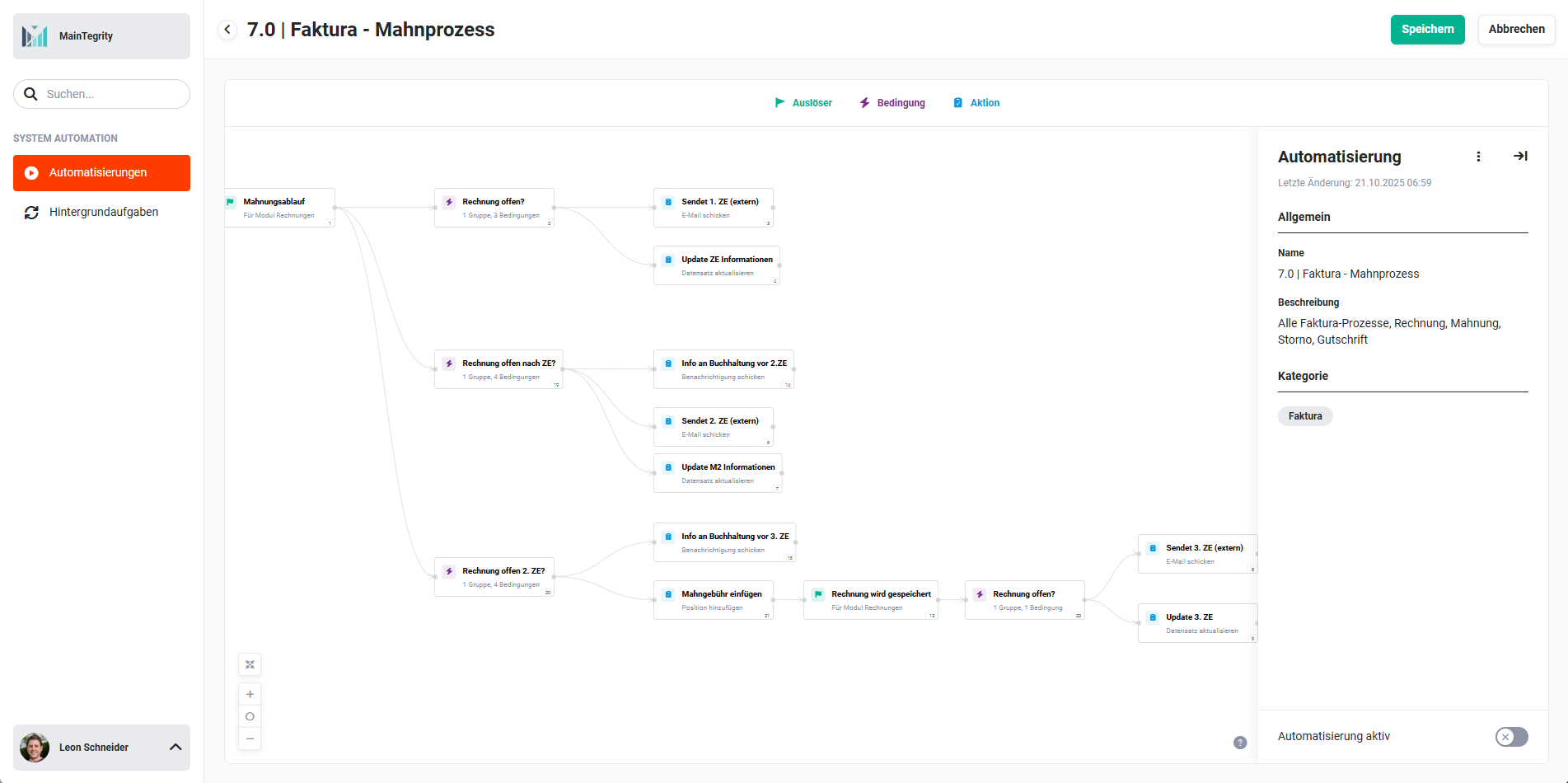 Overview 7.0 | Billing – Dunning Process
2. Billing - Dunning Process - Triggers, Conditions and Actions
2.1. Trigger: Dunning sequence (Trigger - #1)
The first trigger starts the dunning process for an invoice. It is triggered by a defined point in time or an event in the Invoices module and initiates the first payment reminder strand.
Connections to preceding/following nodes:
- preceding: none
- following: Invoice open? (Condition - #2))
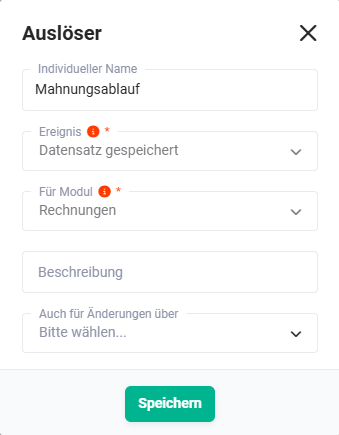 Trigger „Dunning sequence"
2.2. Invoice open? (Condition - #2)
The condition checks against 3 criteria whether the invoice is still open and a first payment reminder should be sent (e.g. status not paid, dunning run active, due date exceeded).
Connections to preceding/following nodes:
- preceding: Dunning sequence (Trigger - #1))
- following (condition met): Sends 1st PR (external) (Action - #3)
- following (condition not met): no further actions
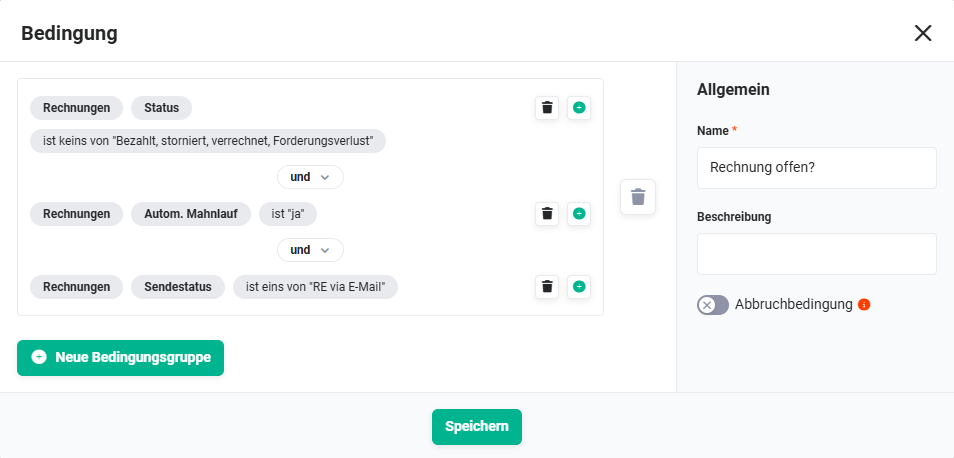 Condition „Invoice open?"
2.3. Sends 1st PR (external) (Action - #3)
If the invoice is open, the first payment reminder is sent to the customer (external) by email.
Connections to preceding/following nodes:
- preceding: Invoice open? (Condition - #2))
- following: Update PR information (Action - #4))
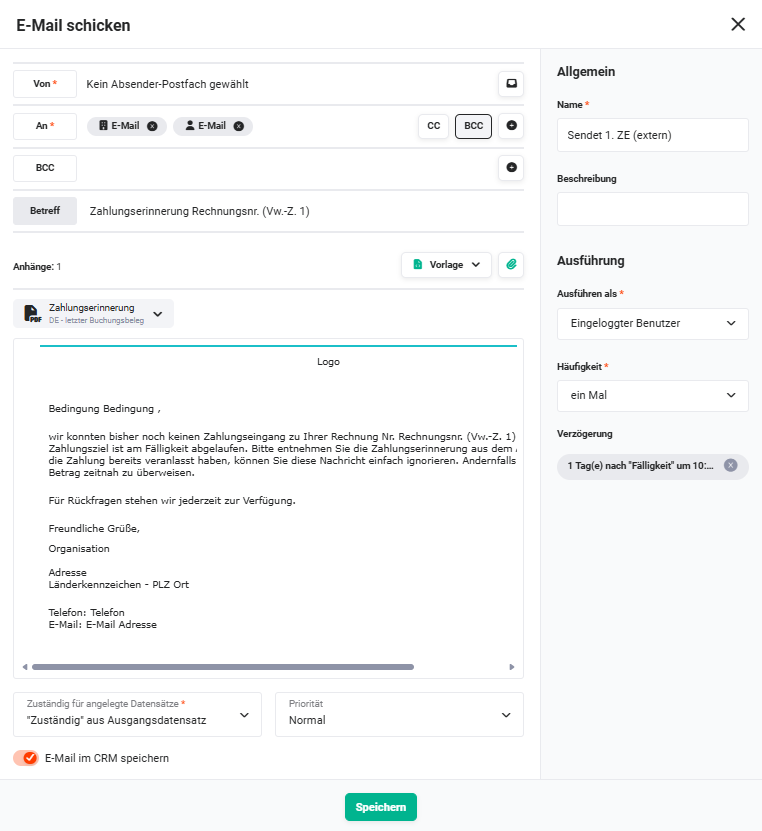 Action „Sends 1st PR (external)"
2.4. Update PR information (Action - #4)
After the first payment reminder has been sent, the invoice record is updated – e.g. send status, date of the payment reminder.
Connections to preceding/following nodes:
- preceding: Sends 1st PR (external) (Action - #3)
- following: none (the next stage is controlled by the trigger “Invoice is saved (Trigger - #13))”)
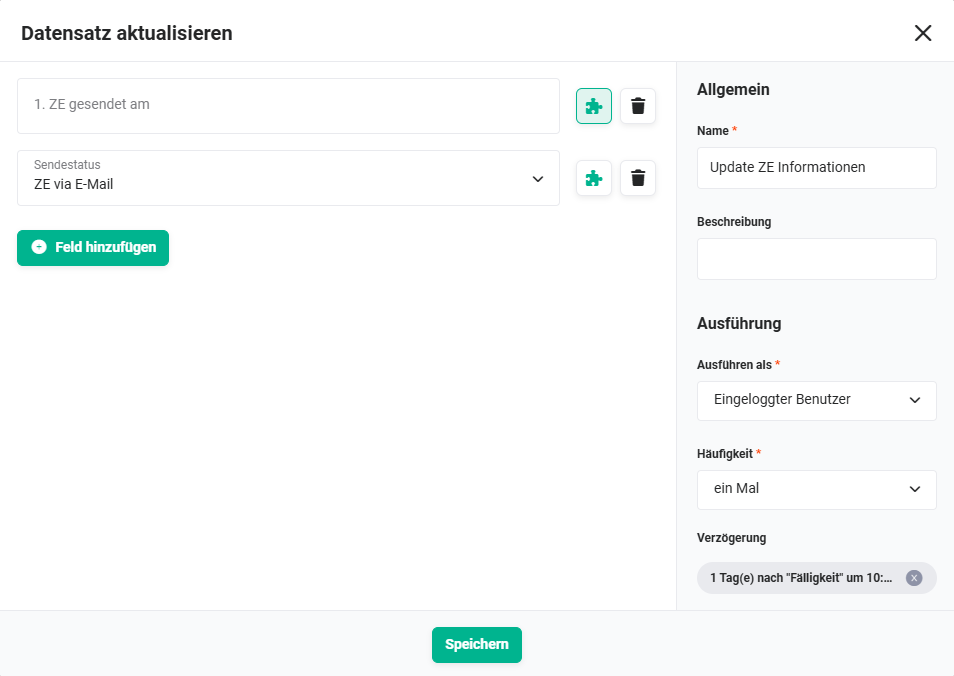 Action „Update PR information"
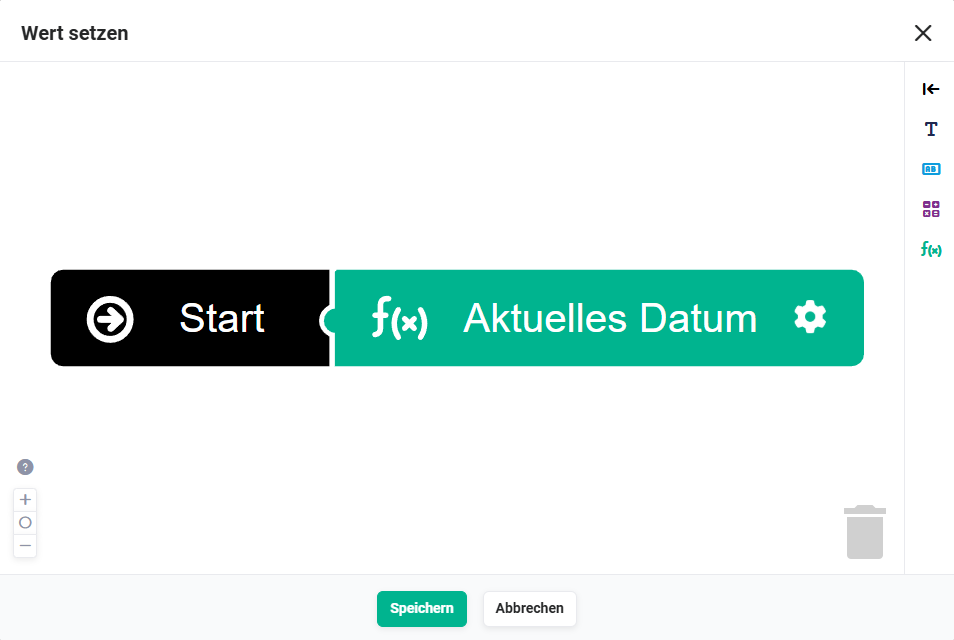 Action „Update PR information" - set value
2.5. Invoice is saved (Trigger - #13)
The second trigger fires on every save operation of an invoice. It controls the subsequent stages of the dunning process (2nd and 3rd payment reminder) as well as the accounting notifications.
Connections to preceding/following nodes:
- preceding: none (standalone trigger)
- following: Invoice open? (Condition - #22)), Invoice open after PR? (Condition - #19)), Invoice open 2nd PR? (Condition - #20))
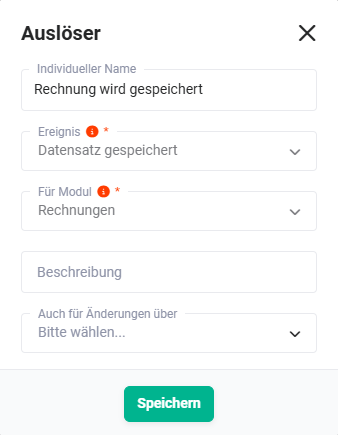 Trigger „Invoice is saved"
2.6. Invoice open? (Condition - #22)
A simple condition with 1 check criterion that checks whether the invoice is still open. Controls the further flow after saving.
Connections to preceding/following nodes:
- preceding: Invoice is saved (Trigger - #13))
- following (met): Info to accounting before 2nd PR (Action - #14)) or Info to accounting before 3rd PR (Action - #16))
- following (not met): no further actions
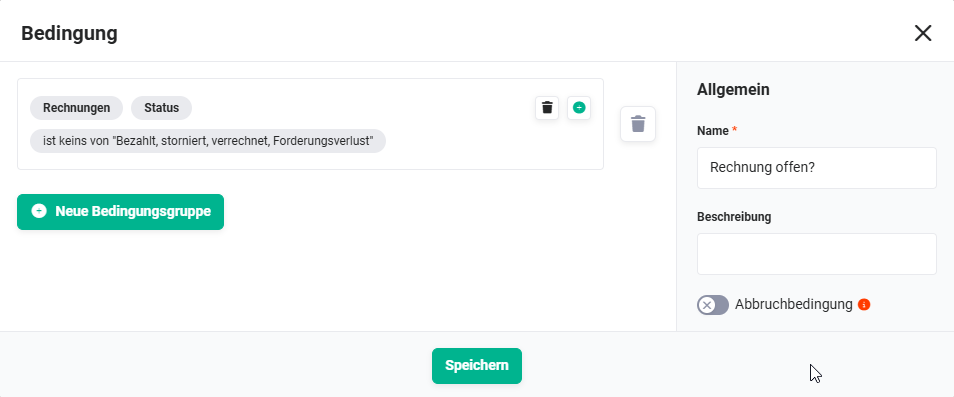 Condition „Invoice open?"
2.7. Invoice open after PR? (Condition - #19)
Checks against 4 criteria whether the invoice is still open after the first payment reminder and whether the second payment reminder should be triggered.
Connections to preceding/following nodes:
- preceding: Invoice is saved (Trigger - #13))
- following (met): Sends 2nd PR (external) (Action - #6)
- following (not met): no further actions
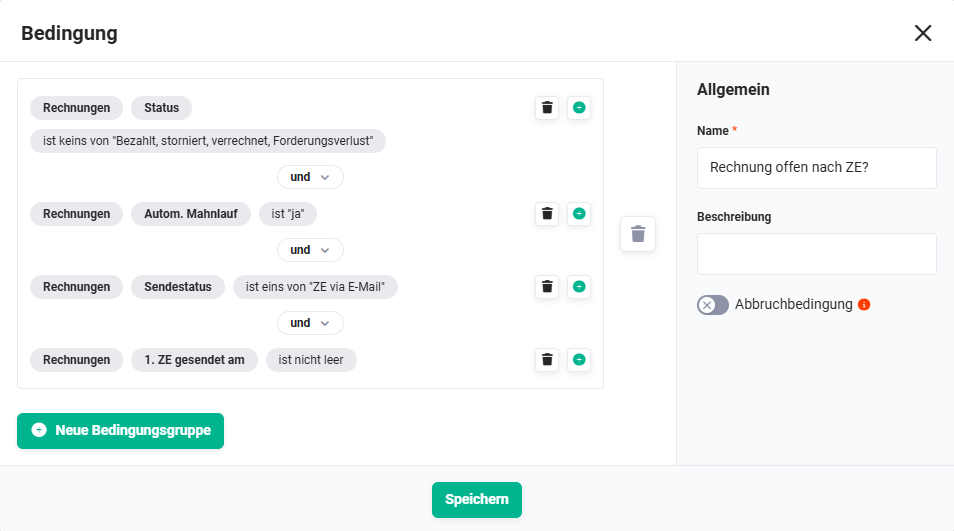 Condition „Invoice open after PR?"
2.8. Invoice open 2nd PR? (Condition - #20)
Checks against 4 criteria whether the invoice is still open after the second payment reminder and whether the third payment reminder (with dunning fee) should be triggered.
Connections to preceding/following nodes:
- preceding: Invoice is saved (Trigger - #13))
- following (met): Insert dunning fee (Action - #21))
- following (not met): no further actions
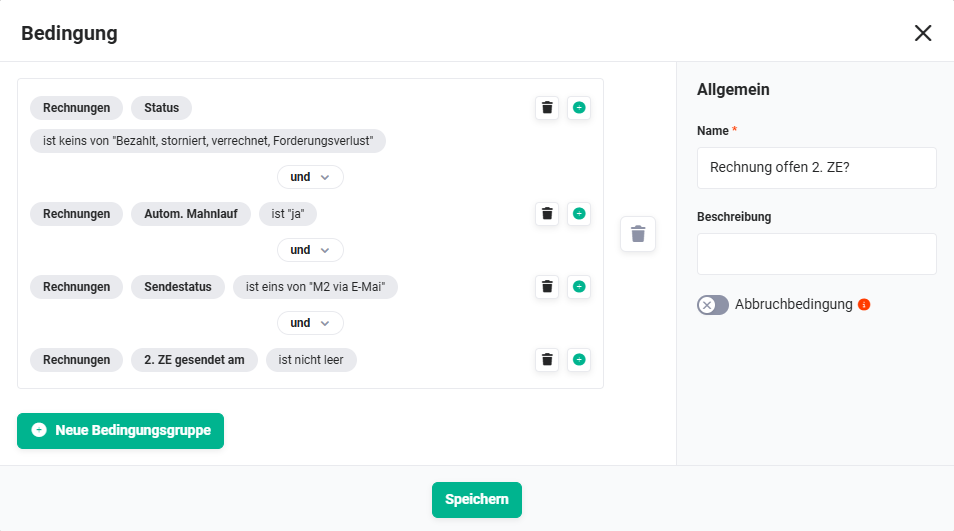 Condition „Invoice open 2nd PR?"
2.9. Info to accounting before 2nd PR (Action - #14)
Before the second payment reminder is sent to the customer, accounting receives an internal notification that the next dunning stage is imminent.
Connections to preceding/following nodes:
- preceding: Invoice open? (Condition - #22))
- following: none (the actual 2nd PR is controlled by condition 19)
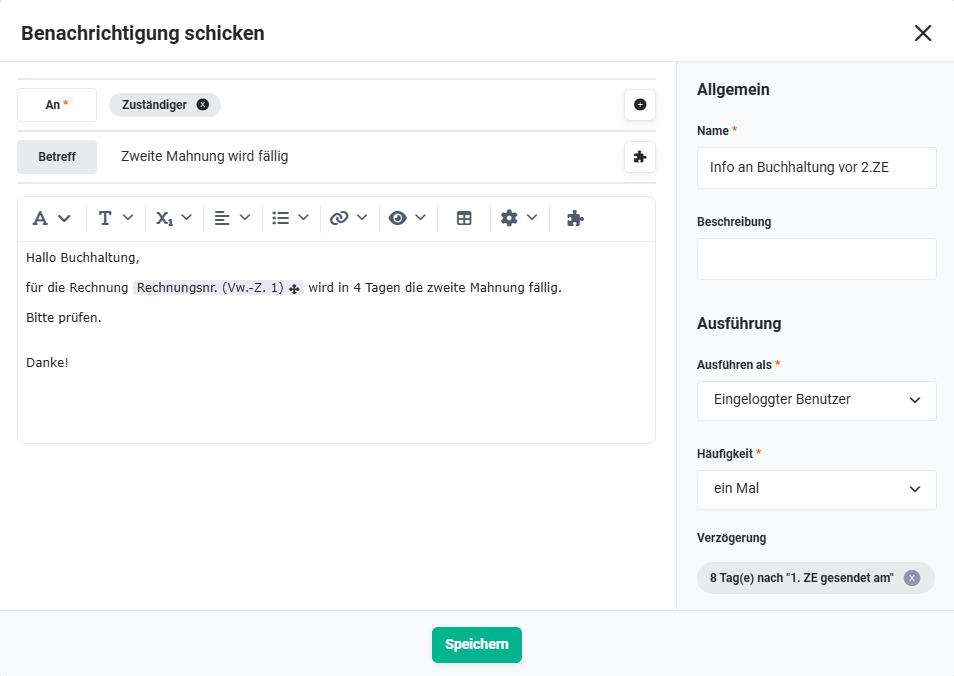 Action „Info to accounting before 2nd PR"
2.10. Info to accounting before 3rd PR (Action - #16)
In line with the logic of node 14, accounting receives an internal notification before the third payment reminder (with dunning fee) is executed.
Connections to preceding/following nodes:
- preceding: Invoice open? (Condition - #22))
- following: none (the actual 3rd PR is controlled by condition 20)
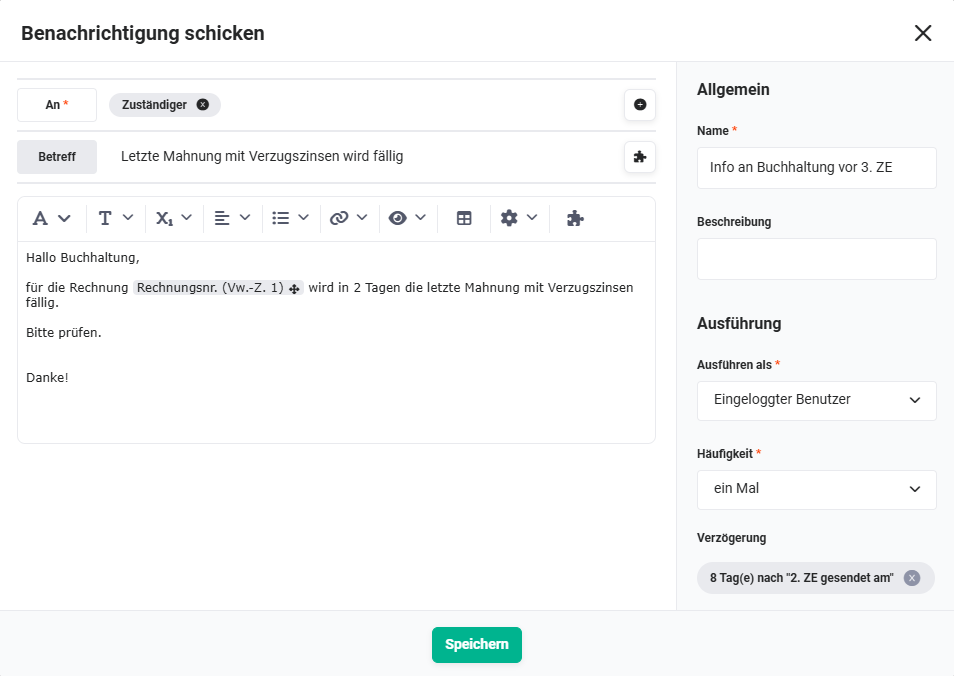 Action „Info to accounting before 3rd PR"
2.11. Sends 2nd PR (external) (Action - #6)
If the condition “Invoice open after PR? (Condition - #19))” is met, the second payment reminder is sent to the customer by email.
Connections to preceding/following nodes:
- preceding: Invoice open after PR? (Condition - #19))
- following: Update M2 information (Action - #7))
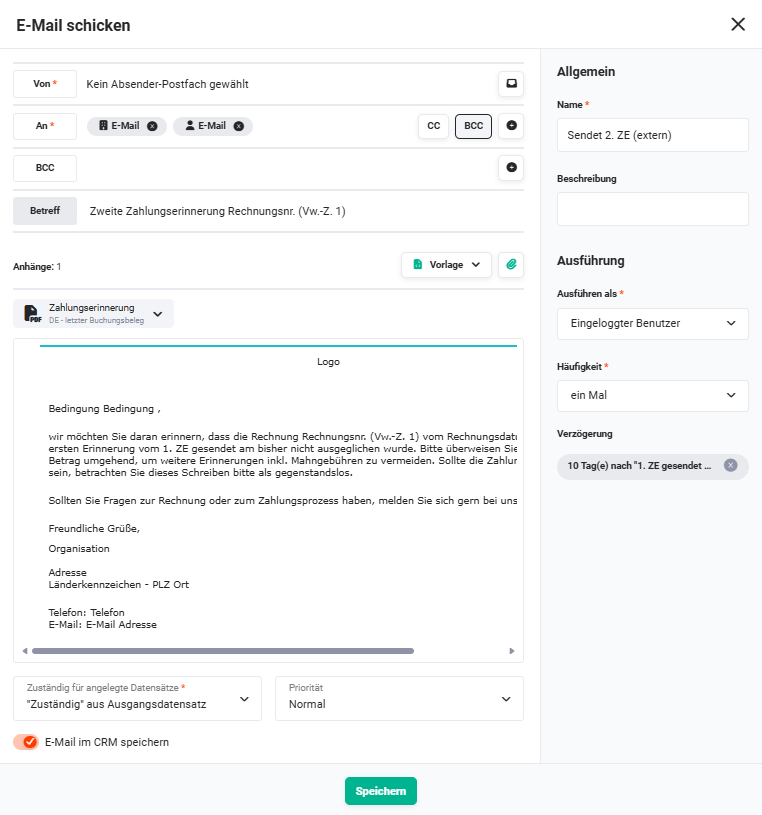 Action „Sends 2nd PR (external)"
2.12. Update M2 information (Action - #7)
After the second payment reminder has been sent, the invoice record is updated – e.g. send status, date of the second payment reminder.
Connections to preceding/following nodes:
- preceding: Sends 2nd PR (external) (Action - #6)
- following: none
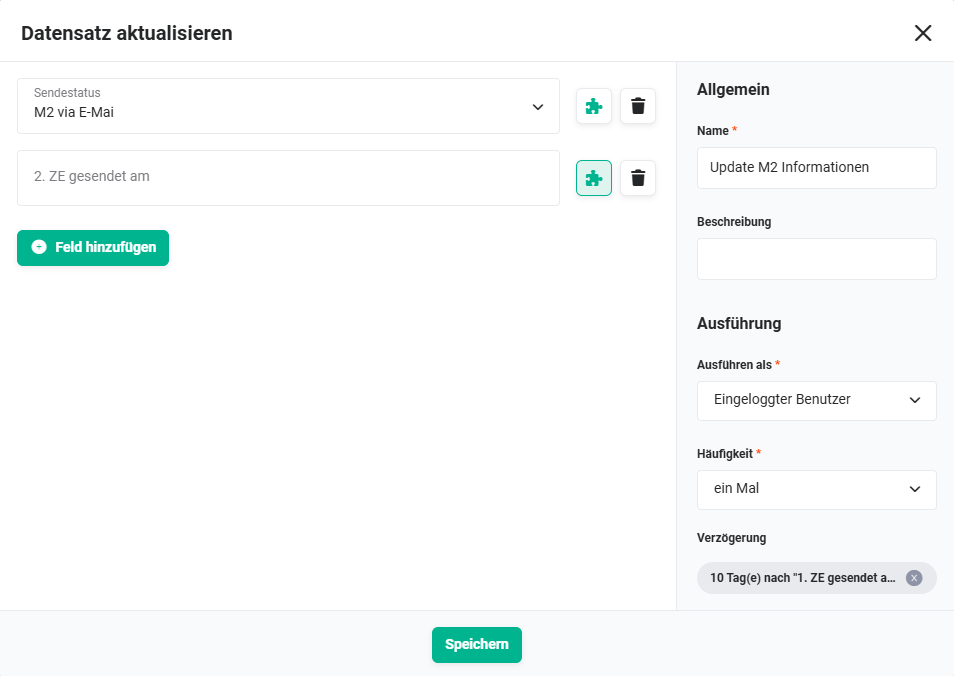 Action „Update M2 information"
2.13. Sends 3rd PR (external) (Action - #8)
If the condition “Invoice open 2nd PR? (Condition - #20))” is met, the third payment reminder is sent to the customer by email. This stage additionally includes a dunning fee (see Insert dunning fee (Action - #21))).
Connections to preceding/following nodes:
- preceding: Insert dunning fee (Action - #21))
- following: Update 3rd PR (Action - #9))
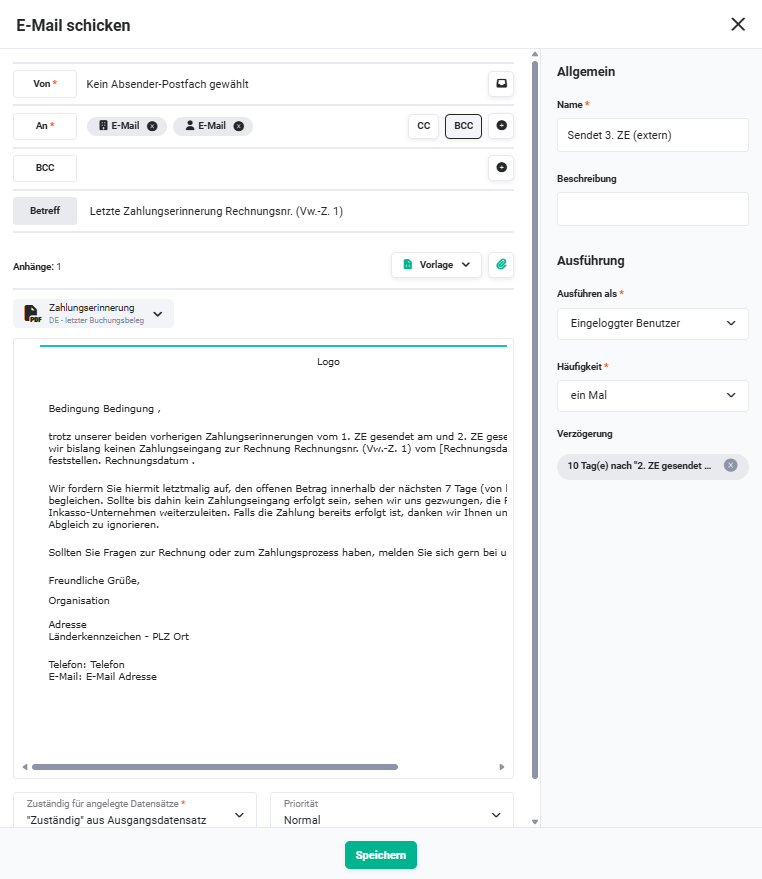 Action „Sends 3rd PR (external)"
2.14. Insert dunning fee (Action - #21)
Before the third payment reminder is sent, a dunning fee is inserted into the invoice as a new line item. A predefined product is used for this (e.g. “dunning fee” with a fixed amount). Alternatively, default interest can be calculated.
Dunning fee and default interest are mutually exclusive. Which variant is used, as well as the amount or interest rate, can be configured individually in the automation.
Connections to preceding/following nodes:
- preceding: Invoice open 2nd PR? (Condition - #20))
- following: Sends 3rd PR (external) (Action - #8)
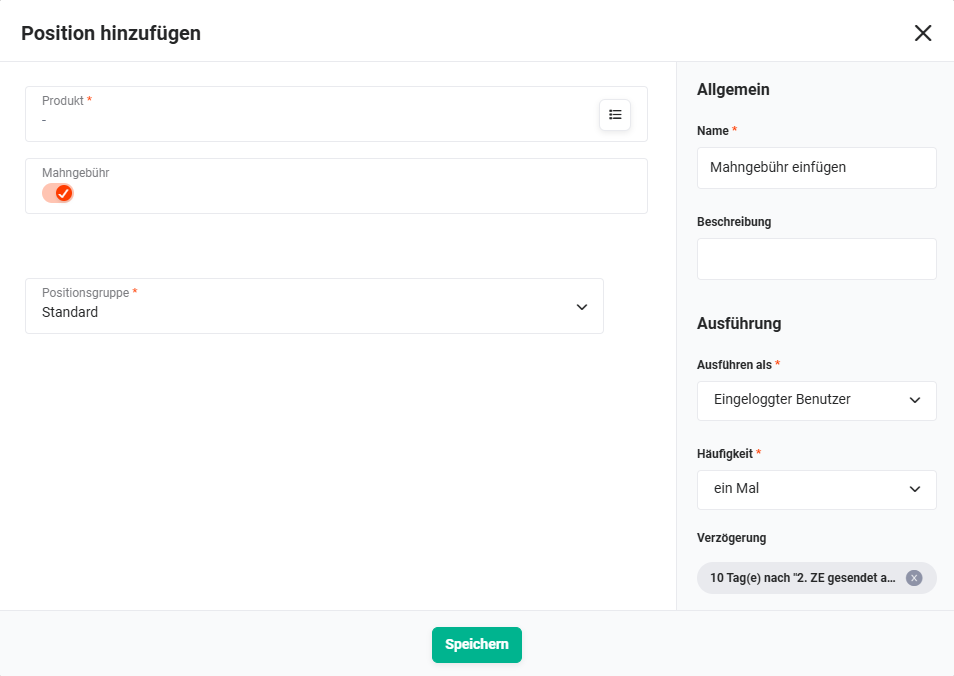 Action „Insert dunning fee"
2.15. Update 3rd PR (Action - #9)
After the third payment reminder has been sent, the invoice record is updated – e.g. send status, date of the third payment reminder.
Connections to preceding/following nodes:
- preceding: Sends 3rd PR (external) (Action - #8)
- following: none
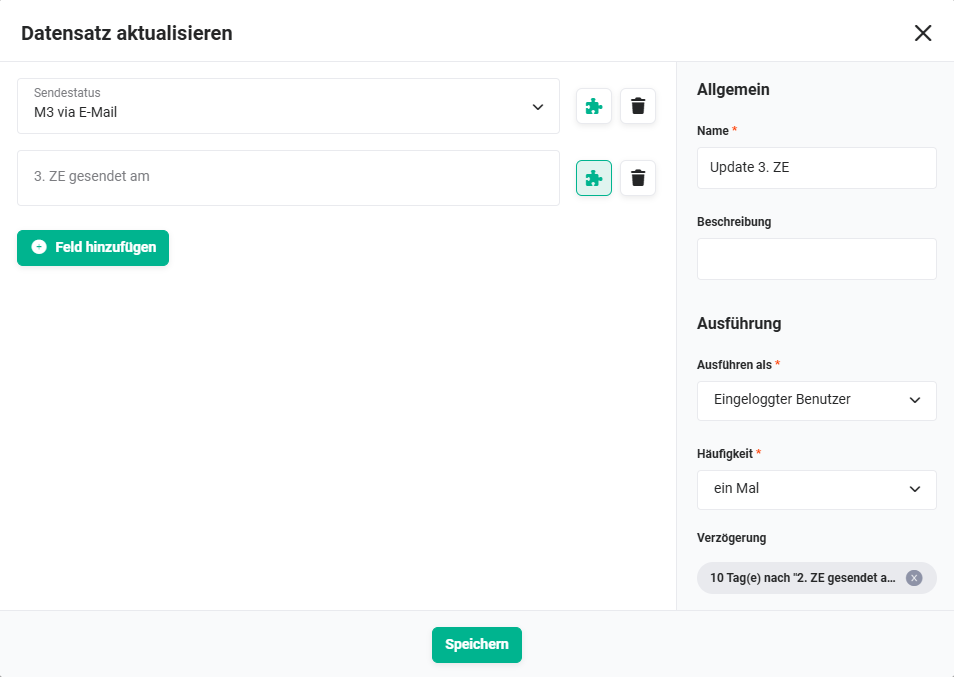 Action „Update 3rd PR"
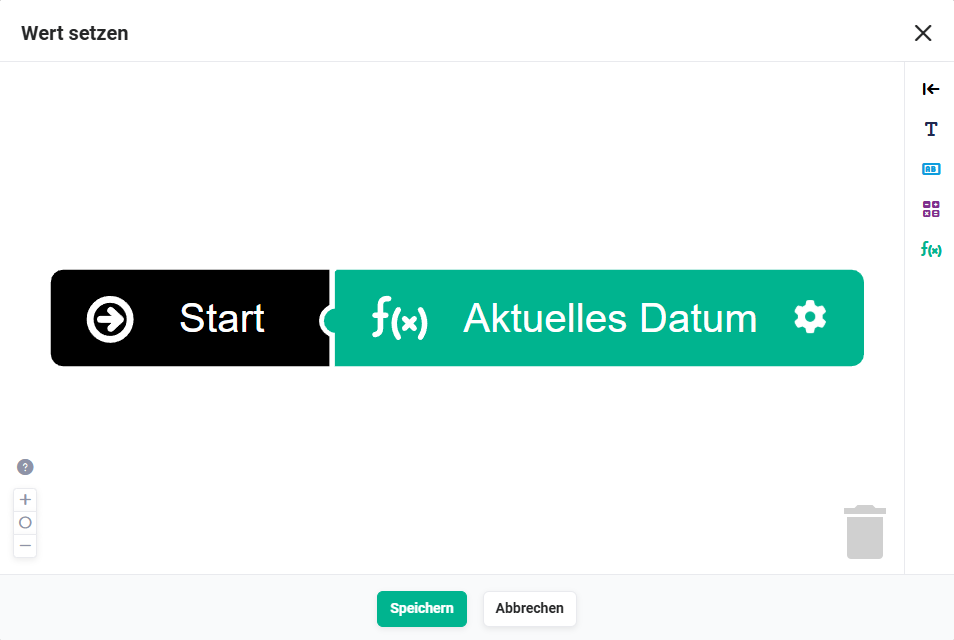 Action „Update 3rd PR" - set value