
Navigation Bar / Main Menu
Package: BASIC
1. General
The navigation bar in brainX can be regarded as the main menu, from which — among other things — quick access to frequently used modules is possible.
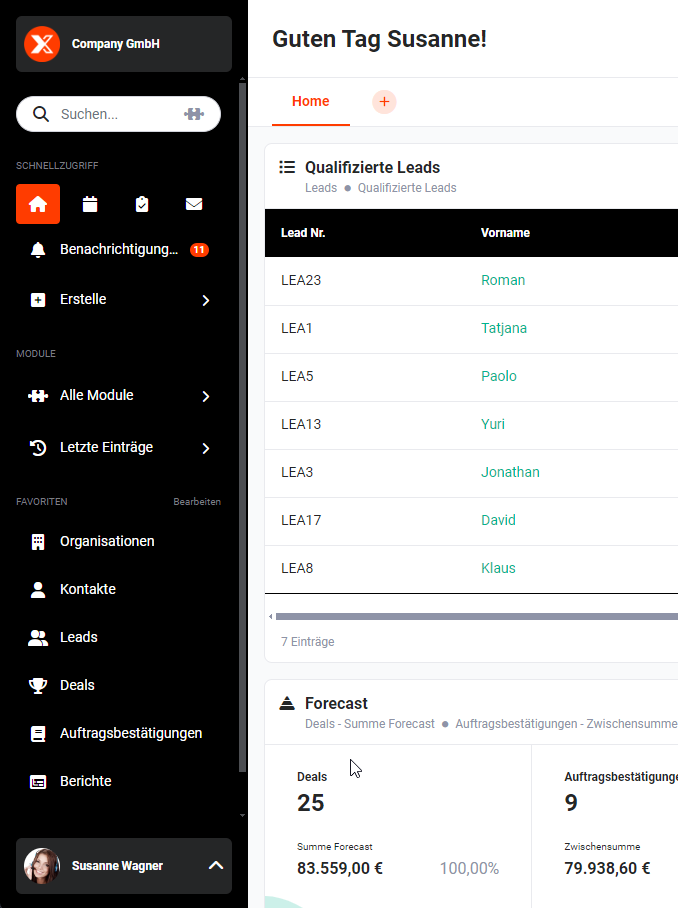 Navigation Bar / Main Menu
Via the "All Modules" menu item, the available modules can be opened directly. The last entries — i.e. the most recently accessed records — can also be selected again directly here. In the "Favourites" area, all modules marked as favourites are listed for quick access. Direct access to notifications, a global search and the user menu round out the contents of the navigation bar.
The following pages contain detailed descriptions of all navigation bar functions:
2. Switch Tenant
If multiple tenants have been set up and a user has permission to use more than one tenant, the user can switch between tenants without having to log out and back in.
After clicking the Switch Tenant action icon (double-arrow icon), a flyout menu opens in which a tenant can be selected.
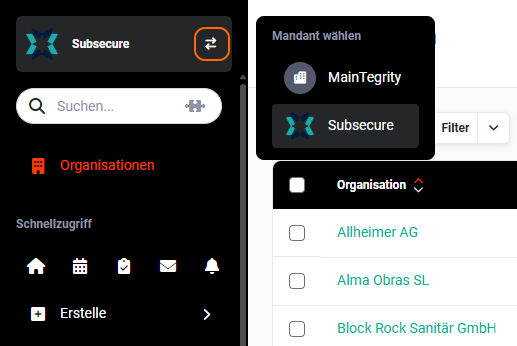 Navigation Bar – Select Tenant
After clicking a tenant, all settings and permissions of the selected tenant are loaded for the user.